AVM-firewall⚓︎
- Package: master/make/pkgs/avm-firewall/
- Steward: -
The AVM-firewall-CGI provides a web interface for administering the
integrated firewall that AVM withholds from the user. The firewall is a
component of AVM's "dsld", so this firewall cannot really be started or
stopped; it is actually always running as long as dsld is on the box.
A few words about the "basics" and the philosophy AVM implements with
it:
- AVM's firewall is probably designed as an "additional firewall".
- The "firewall" is placed in front of the WAN path and acts on packets
that come from the WAN interface or go to the WAN. It has no
effect inside the box. - The box has a second (the "actual") protection for the WAN interface:
all incoming packets for which there is no entry in the NAT table are
discarded.
These NAT entries are created either dynamically, when the internet is
accessed from the LAN, or statically when entries exist in
"port forwarding". This procedure always applies; even the box processes
themselves do not accept packets without such NAT, which is why there are
port forwards "to the box itself" for them.
The firewall therefore only additionally filters packets; the actual
"security" is implemented through the "NAT mechanism". This is also why
the firewall's "default setting" for all packets that are not forbidden
is: Permit.
This firewall therefore becomes truly effective either for blocking
certain outgoing connections, or when one "does a lot of work" and allows
all required connections, then sets the default rule to "Deny".
Personally (I hope I am allowed to say this even as the "author"), I
would rather use iptables for deeper interventions...
Feature Overview⚓︎
With AVM-FIREWALL-CGI, the following can be done directly through a web
interface:
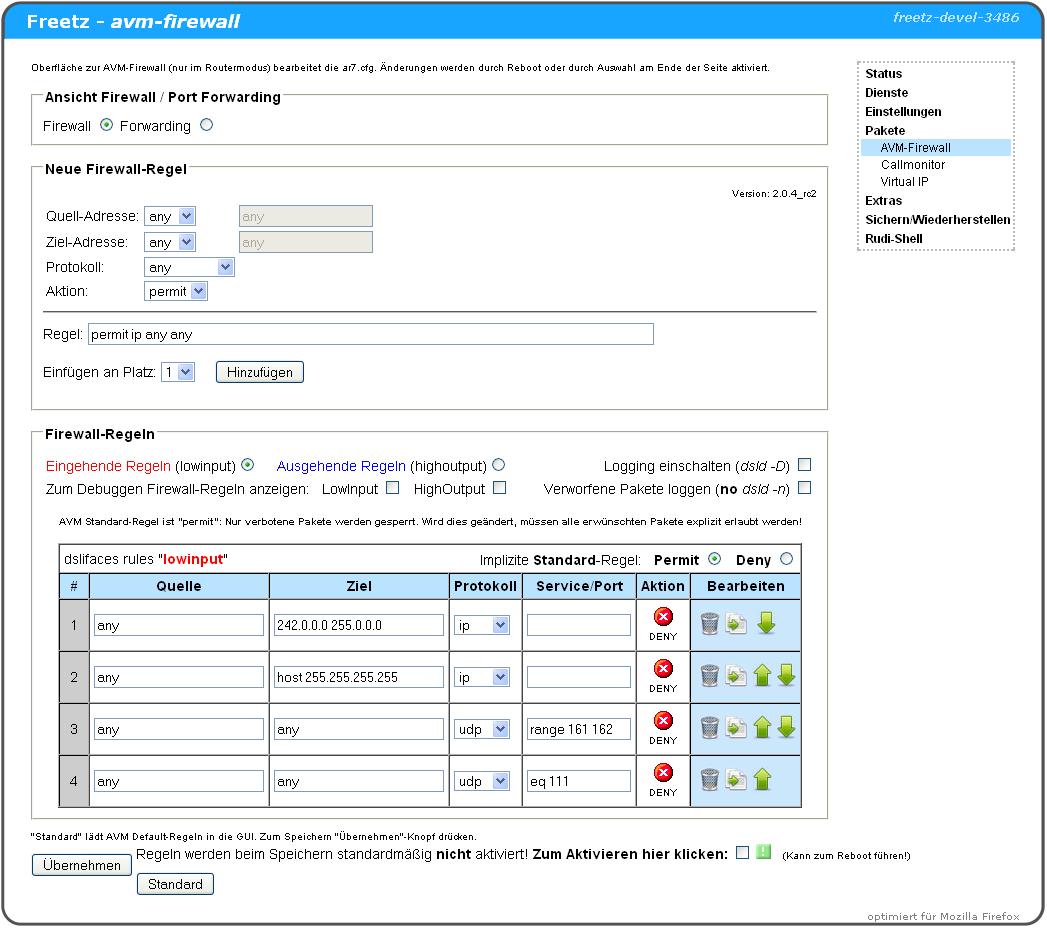
- Change/delete the firewall rules predefined by AVM.
- Add custom rules, which is very practical for preventing annoying
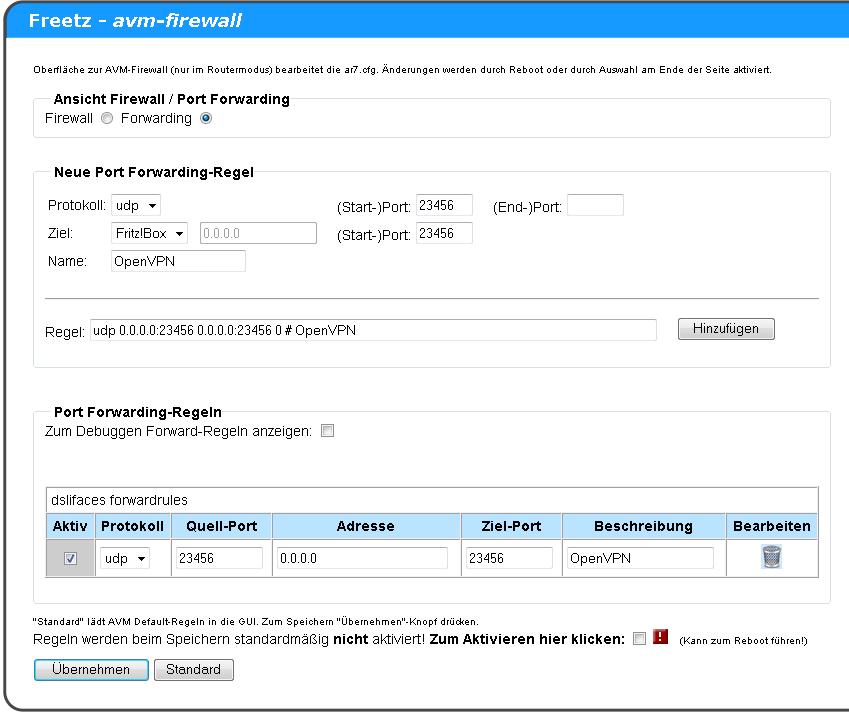
"phoning home" by some software from the router. - Create port forwards that can also point to the Fritz itself
(0.0.0.0), for example for FTP or web server shares to the internet.
The syntax should not be too difficult; the dropdown fields are there for
that.
Applying the Changed Rules⚓︎
The fact that AVM either does not provide for changes to the rule set (in
the firewall) or manages the changes itself (forwarding) requires special
measures to actually apply changes made in the GUI. For this, AVM
services are restarted, which can cause the box to crash and even reset
to factory defaults; therefore the animated warning graphic appears at
the end of the page.
To avoid all problems, the "Apply" checkbox should not be set;
instead, the rules should "only" be saved and the box then restarted.
Addition for the trunk version, as of 2010-02-22 In this version,
four selection points are now provided for applying the rule sets, so the
described crash problems can be narrowed down better (see image below).
Here is a brief explanation:
The GUI touches two AVM daemons (ctlmgr and dsld): dsld because this is
where the rules actually take effect, and ctlmgr because it performs
its own rule management.
- Changes made in the Freetz GUI are unknown to AVM's "rule
management". Therefore, ctlmgr must be restarted to anchor these
changes there as well. If ctlmgr is not restarted, changes in the AVM
GUI can undo all changes in this GUI, both in the firewall and in
forwarding. - To activate firewall changes, dsld must be stopped and restarted.
- To activate changes to the dsld options, dsld must also be
restarted. - To apply port forwarding changes, dsld does not need to be
completely restarted; it is enough to "instruct" it via a signal
(HUP) to reload and apply the rules.

The Danger of Reboot Loops and How to Get Out of Them⚓︎
In numerous attempts to set up firewall rules using this CGI package, it
has become apparent that extensive changes can cause the box to restart
again and again. This also happens with completely legitimate rules and
seems to be related to the size of the rule set. Subjectively, port
blocks seem less critical to me than IP range blocks via subnet addresses
and masks. This occurred for me on a 7270v3 with 74.04.88 and Freetz 1.2
Revision 7500; another user reported the same from a 7390.
The cause of the problem is buried somewhere in AVM's "dsld", which also
provides the firewall function, and has since been investigated,
especially thanks to
"MaxMuster" (see the
"literature references" from IP-Phone-Forum at the end of this page).
Remedy⚓︎
After being informed of the facts described here, AVM found the bug and
intends to fix it in the next lab version of the firmware. The X.05.05
versions are definitely still affected. Until then, it may help to observe
the following notes when creating firewall rules.
There must not be more than three "similar" rules for the "IP" protocol
directly one after another. The following types are affected:
- „ip reject [...]"
- „ip deny [...]"
- „ip permit [...]"
So after at most three lines that begin with "ip reject", at least one
other line must be inserted, so that never more than three lines of the
same "type" follow one another. Port-forward rules and port blocks do not
seem to be affected, but the latter can be mixed with the other lines to
prevent the bug. If there are not enough "different" rules, existing ones
can be repeated or other ineffective rules can be inserted.
On two 7270s, this procedure worked reproducibly. In one case, on the
already mentioned 7390, this does not seem to have been sufficient.
Instructions for Ending an Accidentally Triggered Reboot Loop⚓︎
The following solution works only if a firewall change actually causes
the restarts and is not a cure-all for reboot loops. It also does not
work if the router is running in Ethernet mode, meaning it does not build
the ADSL connection itself. It has only been tested in normal ADSL router
mode, without an external modem. Overwriting the flash memory with a
backup is unnecessary in this special case; nevertheless, a working full
backup and everything needed for recovery should absolutely be ready when
making changes to the AVM firewall.
Fortunately, in this case no restart occurs if ADSL connection setup is
prevented, meaning the ADSL cable is unplugged from the splitter. The
analog or ISDN telephone cable can remain connected, so during the repair
time there is no internet, but telephone is available. The risk of
experimenting with the firewall is therefore smaller than it may seem at
first glance when reading about "reboot loops".
How Do I Recognize That Such a "Reboot Loop" Is Happening?⚓︎
The router shows the typical "startup blinking sequences" of the LEDs. If
you keep trying, you may briefly get into the web interface, but a few
seconds later it already "hangs" again; the time is not enough to undo
the last changes. This is because everything runs normally until the
internet connection is established, at which point the kernel crashes.
How Do I Fix the Problem Without FTP Flashing?⚓︎
- Unplug the ADSL cable from the splitter.
- Wait until the router has started properly and the Freetz CGI is
running again. This can take a while; depending on which package set
is installed in Freetz, not all programs come up almost
simultaneously. - Revert the firewall changes that caused the error.
- Trigger a restart through the Freetz web interface.
- Plug the ADSL cable back in.
References⚓︎
In IP-Phone-Forum, there are several
threads about the AVM firewall, for example:
- unstable AVM firewall on
7270
(current discussion thread) - Call to document the internal
Firewall - (NEW) AVM-Firewall package for
Freetz - Blog by
real-riot