NHIPT Iptables CGI 0.8.3a - DEPRECATED⚓︎
- Package: master/make/pkgs/nhipt/
- Steward: -
MOTIVATION⚓︎
iptables is a command-line user interface for configuring and managing
the very powerful netfilter
firewall functions built into the respective Linux kernel. With the
nhipt web interface, the entire range of iptables can be used on the
FritzBox through a user-friendly interface. The CGI can be integrated
into the firmware as a package or used standalone as an external
package.
REQUIREMENTS:⚓︎
- nhipt was created for the 7270 and runs without problems on all 72xx
boxes with the new kernel; 71xx / 70xx boxes with the old kernel can
also be used with limitations. - Limitations when using boxes with an older kernel (71xx/70xx):
- System warnings when trying to load nonexistent kernel modules
- Conntrack rules can cause problems
- nhipt also runs very well on the 7390, but applying the patch
attached below is required; otherwise only a white screen is shown. - iptables must exist and run.
At least the following modules should be in the Freetz image (if
there is space, preferably all of them, so the interface can unfold
its full potential):
- ip_tables * ip_conntrack * ipt_log * xt_state
- x_tables * ip_conntrack_ftp * ipt_REJECT * xt_conntrack
- iptable_filter * ip_conntrack_tftp * ipt_iprange * xt_multiport
* xt_tcpudp
!!! Please do not forget to also integrate the corresponding shared
libraries into the firmware !!!A build with a replaced kernel and the kernel's autoload modules
function enabled is ideal:Before the first start, enter iptables -S to load iptables
(when built with replaced kernel and automatic kernel module
loading).
Alternatively, without the autoload option, load the iptables modules
listed above individually with modprobe.
THREE PACKAGES ARE AVAILABLE:⚓︎
nhipt.cgi.(version).tar.gz⚓︎
This is the pure GUI; it runs directly from the stick without
integration into freetz.
Installation:
- Unpack the file nhipt.cgi, for example into a directory such as
/var/media/ftp/uStor01/ipt/cgi-bin on the stick. - Set execute permissions on it.
- Set up an httpd service on the parent directory /ipt and a free
port, for example 83.
chmod +x /var/media/ftp/uStor01/ipt/cgi-bin/nhipt.cgi
httpd -P /var/run/nhipt.pid -p 83 -h /var/media/ftp/uStor01/ipt
The interface is called with
http://fritz.box:83/cgi-bin/nhipt.cgi
ipt.(version).tar.gz⚓︎
This is the Advanced-Comfort package with dynamic Freetz integration.
Installation:
- Unpack to /var/media/ftp/uStor01/.
- Give the file register.sh execute permissions.
- Run the script register.sh.
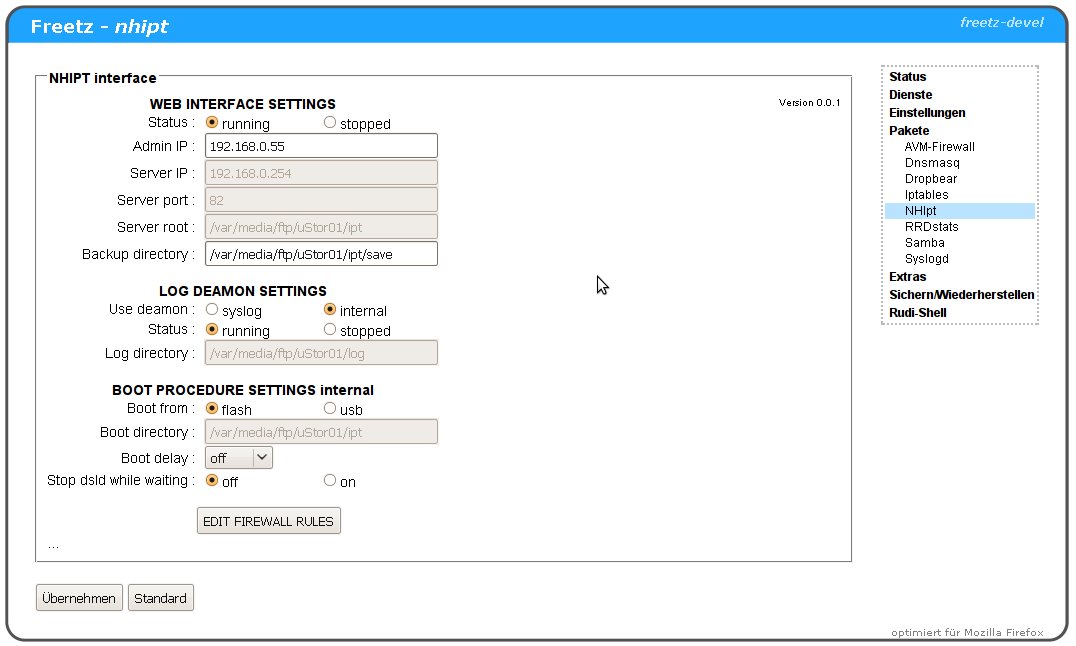
A new package can now be seen in Freetz. The rest can be configured
there and the interface can be started.
Via make menuconfig⚓︎
The GUI is integrated into the ROM of the FritzBox via the firmware
build, currently only in the current trunk or as a patch.
Installation:
When using the patch nhipt.patch(ver).tar.gz
change into the freetz folder, copy the patch there, and apply it:
patch -p0 < nhipt.patch
change into the folder make/nhipt/files/root/... and set execute
permissions on all files (see FILES IN THE FREETZ PACKAGE below)Call make menuconfig, in the area Package Selection --->
Web Interface ---> select the option NHIPT Iptables CGI. All
iptables modules now become visible as a submenu and can be combined.
Then use the usual procedure for building firmware...
MODE OF OPERATION:⚓︎
Tips & Literature:⚓︎
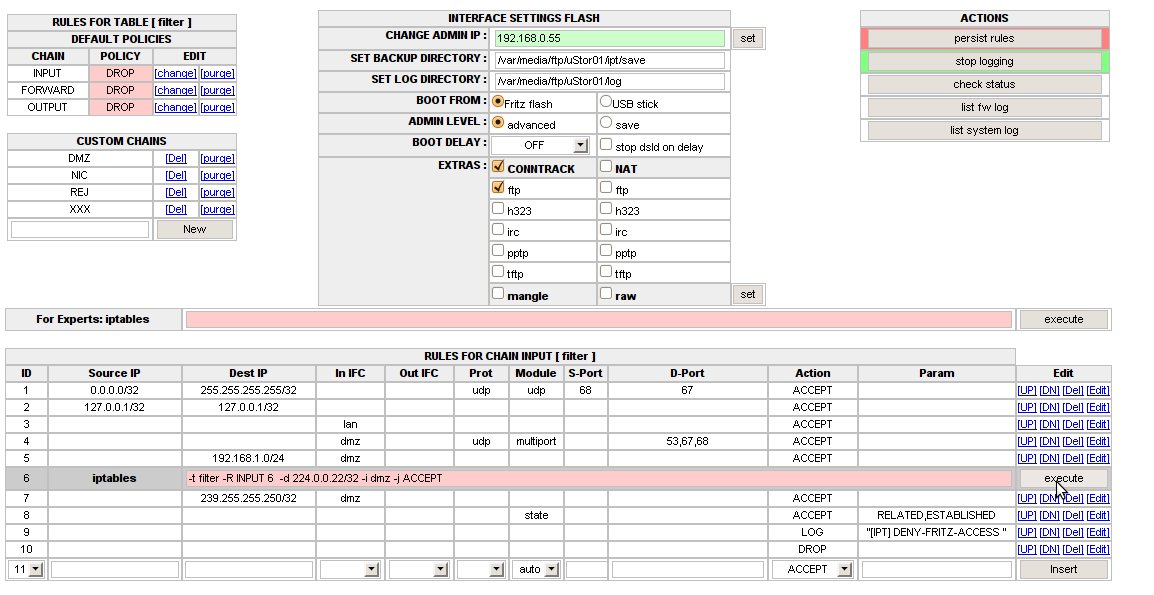
All active rules are listed and can be edited immediately as usual.
Rules are made reboot-proof with the save function [Persist rules].
The generated start script can be stored either in the box flash or
externally [BOOT FROM FLASH / USB] + [SET BOOT DIRECTORY]. During
startup it is automatically brought to life by debug.cfg. Rules can be
entered both via mask selection (the matching modules are automatically
determined for most rules based on the parameters) and in expert mode
(command line with iptables syntax); they always take effect
immediately.All tables and the most important extensions of conntrack and
nat can be selected in the user interface. They are automatically
loaded, or unloaded when deselected if possible. The interface supports
both IPv4 and IPv6 rule sets, if ipv6 is enabled on the box.If an admin address or subnet is entered in the [CHANGE ADMIN IP]
field, configuration can only be performed from this IP. The lock
remains effective even after a reboot.In addition, the CGI has its own log function for DECT boxes. On
request, the CGI takes over all necessary settings for this; the log
directory can be chosen freely.Error messages, system messages, etc. from iptables and the UI are
output in the status lines below the rule set; status 0 is always OK.
Boot Process⚓︎
- debug.cfg can copy the settings into the RAM disk and start the
initialization. - rc.nhipt load is called by rc.mod / run level 20 and
checks whether the settings are already in the RAM disk (from a
previous boot with debug.cfg). If they are not, it calls
/tmp/flash/nhiptboot.cfg, which takes over initialization instead
of debug.cfg. - debug.cfg and nhiptboot.cfg have identical content structure:
- they wait for a USB stick if required
- copy the settings nhipt.par from a known location (flash /
USB) into the RAM disk - copy the start script nhipt.cfg into the RAM disk
- start the firewall start script nhipt.cfg and send it to the
background.
- nhipt.cfg:
- stop dsld, if configured
- wait for the delay timer, if configured
- start dsld, if configured
- start the web server for the UI
- start the internal log service, if configured
- load firewall rules
Scenario 1: Standalone CGI - always boots from debug.cfg, rules
in flash / stickScenario 2: Dynamic freetz - boots either from debug.cfg or
delayed via freetz rc.custom when integrating the CGI into freetz;
the install script for freetz integration automatically registers
itself in rc.custom for reboot capabilityScenario 3: Integration into the runlevels of Freetz, optionally
still via debug.cfg.
Configuration File⚓︎
The configuration file can be found at runtime under /var/tmp/nhipt.par;
for reboot persistence, it is stored in BOOTDIR together with nhipt.cfg.
BACK=/var/media/ftp/uStor01/save
CHANGED=0
DELAY=0
LOGTARGET=internal
DSLDOFF=0
ADMINIP=
LOGD=/var/media/ftp/uStor01/log
AIRBAG=0
MYIP=
BOOTSTRAP=freetz
PORT=83
BOOT=flash
BOOTDIR=/tmp/flash
ROOT=/usr/ipt
Files in the Freetz Package⚓︎
/etc/default.nhipt/nhipt.cfg       rwxrwxrwx    # config for freetz mask
/etc/init.d/rc.nhipt               r-xr-xr-x    # callback for freetz mask, boot loader
/usr/ipt/index.html                r--r--r--    # frameset for UI
/usr/ipt/cgi-bin/nhipt.cgi         r-xr-xr-x    # the CGI for iptables
/lib/cgi-bin/nhipt.cgi             r-xr-xr-x    # the CGI for freetz settings
WELL-MEANT ADVICE:⚓︎
One more thing about locking yourself out, for everyone who has never
installed a firewall before.Firewalls protect systems from unauthorized access based on rules; these
are executed rigidly and consistently. This can lead to someone who has
not thought enough about their rules beforehand locking themselves out
of the system. This often happens to laypeople, and even professionals
are not always safe from it.So that the consequences are not too drastic, here are a few
recommendations / rules for beginners:
- Looking is OK; manually changing scripts is taboo if you do not want
to get gray hair prematurely. - Save rule sets permanently [Persist rules] only when everything
works as it should. A reboot loads the last saved rule set, and
everything is OK again. Older versions are stored as backups with a
timestamp in the [SET BACKUP DIRECTORY] directory. - At the beginning, prefer using the stick for saving. In an emergency,
it can be removed before booting and the box starts without the
iptables firewall. - The UI has a beginner [safe] mode and a professional [advanced]
mode, switchable via [Admin Level]. In safe mode, the firewall
very successfully defends against all administrator lockout attempts.
It causes an ACCEPT rule for this specific IP address to be entered in
all chains important for admin access. After switching to
[advanced], all rules can be edited or deleted as usual. - A [Boot-Delay], selectable from [Off] to [10 min], can
also be configured against lockout. During this time, unhindered
access is possible after a cold start of the box. For safety, internet
access can be prevented automatically during this time with
[stop dsld on delay]. - Locked out of the admin interface by entering a wrong IP address:
file /var/tmp/nhipt.par contains the wrong entry. Delete the line
ADMINIP=... and call the GUI again. Tip: A subnet can also be
entered for AdminIP, for example 192.168.0.10/30; this allows access
from addresses 192.168.0.8..192.168.0.11 Online IP
calculator.. - If all of this is ignored and, against better judgment, you still
lock yourself out, only flashing the firmware again will help.
DOWNLOAD⚓︎
The current version, as well as notes, tips & tricks, and further links
can be found here: IPPF
Forum
KNOWN PROBLEMS⚓︎
On the 7390, only an empty page is displayed; rules cannot be shown /
added.The attached patch fixes this problem and similar ones on other boxes.
The patch also extends the UI's capabilities to output log information
about the firewall and system from the box syslog when logging is done
to a file. The last 50 entries from up to 4 log files are evaluated:
filename, filename.0, filename.1, filename.2. The path and file
name are determined automatically from the parameters of the running
syslogd process.
SCREENSHOTS⚓︎