sispmctl 3.1 - DEPRECATED⚓︎
- Package: master/make/pkgs/sispmctl/
- Steward: -
sispmctl
makes it possible to switch 230V outlets through the USB port of the
Fritzbox, only for Fritzboxes with a USB host port. It supports the
GEMBIRD Silvershield SIS-PM, SIS-PMS, and mSIS-PM USB power strips. These
USB power strips are significantly cheaper than outlets switched over the
network. Thanks to Freetz's capabilities, these outlets can also be
switched over the internet and by telephone.
Limitation⚓︎
Unfortunately, sispmctl does not run on boxes that do not support USB
low-speed mode. These boxes include, for example, the well-known old
7170. The reason is that the USB controller of such boxes is implemented
in an FPGA and was programmed only very sparsely by AVM. Since this part
of the firmware belongs to the closed-source area, we unfortunately do
not see much chance that the situation will improve soon. Nevertheless,
anyone who is familiar with this is warmly invited to enable the USB
controller of a 7170 to talk to the GEMBIRD power strips.
List of boxes with which sispmctl [does not]
work: all x1xx models, for example 3131, 7141, 7170
List of boxes with which sispmctl works: 3370, 7270,
W920V
(Speedport2Fritz)
Usage⚓︎
sispmctl can be used from the command line (telnet/ssh), and it also
contains a small web server that makes it possible to switch the outlets.
Unfortunately, the built-in web server has no authentication option, so
using it over the internet is discouraged even when https is used
(xrelayd, matrixtunnel). It is unfortunately not readily possible to run
the integrated web server via inetd, because sispmctl supports listener
mode only rudimentarily. Even in listener mode, the sispmctl binary does
not support real daemon functionality. For this reason, the integrated
web server must be sent to the background with an & at the end to emulate
daemon-like operation.
If the power strip is connected directly to a Windows computer, the
included software can also configure it so that it performs switching
operations at specific times independently of the computer. sispmctl
has supported this capability since version 3.0 (2011-03-30). Since this
functionality is still fairly new, it is often also implemented by other
packages in Freetz:
- cron: time-controlled switching
- callmonitor: switching by telephone (without answering the call).
- dtmfbox: switching by telephone (with answering the call; via
DTMF). - dropbear (ssh): switching over the internet.
- apache/lighthttpd/busybox-httpd, haserl/php and
xrelayd/matrixtunnel: switching via web interface.
Freetz Webinterface⚓︎
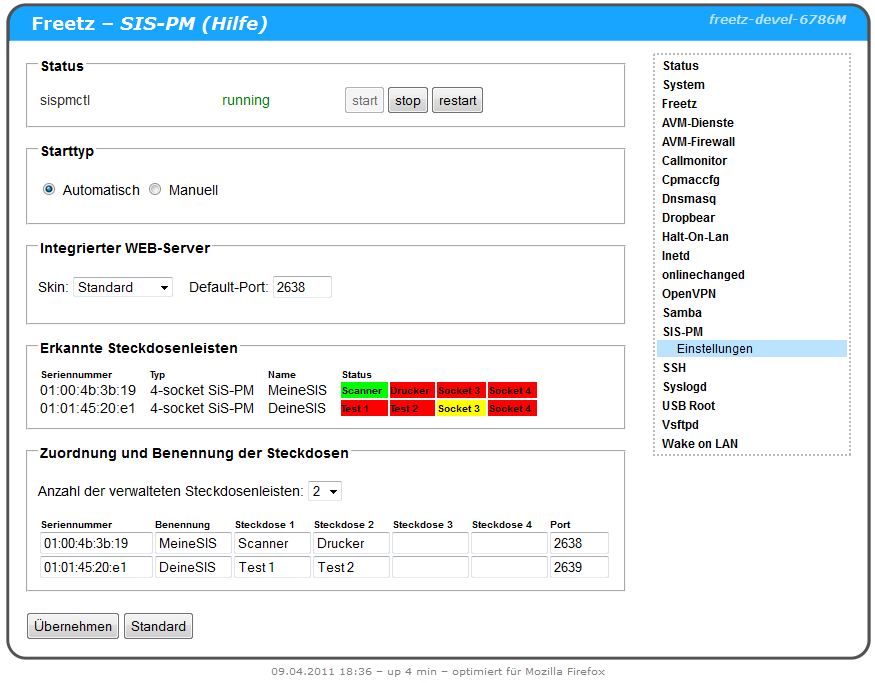
Since mid-March 2011, the first attempts were made to develop a
configuration page for FREETZ and an rc start script. See the further
links for more details.
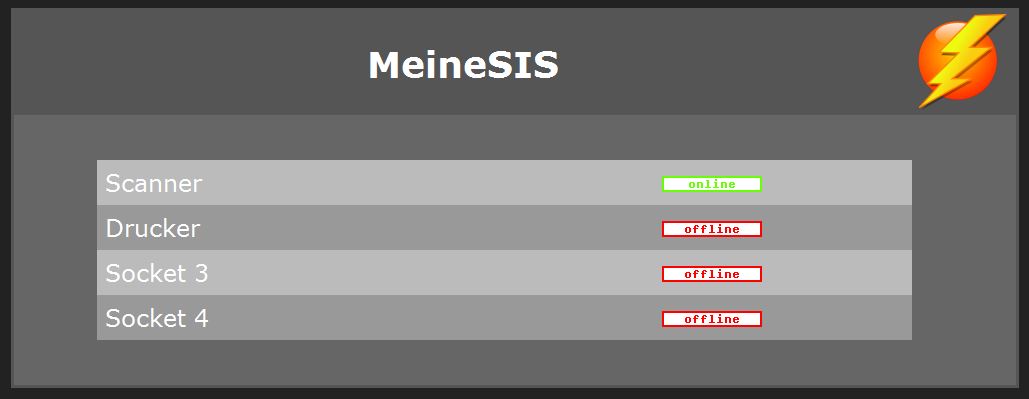
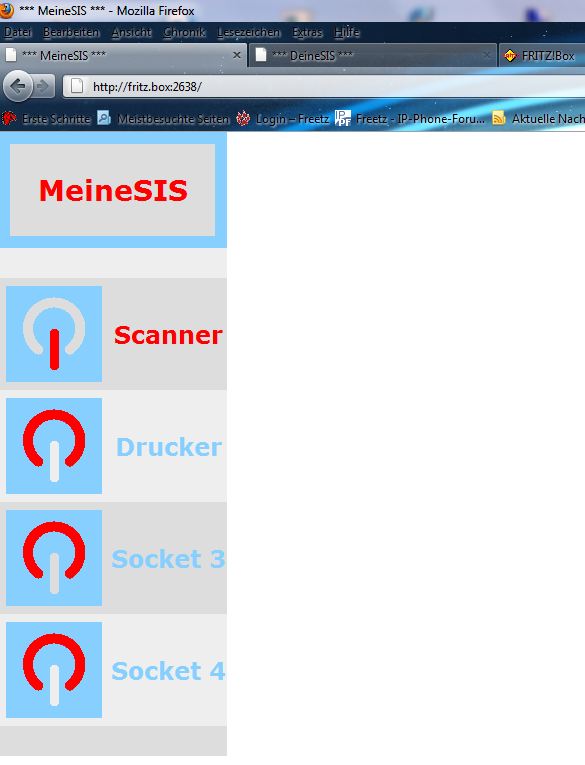
Version 1.0 of sispmctl-cgi allows selecting two additional skins via
menuconfig. The "smartphone" skin in particular is minimalist and well
tailored for small devices. On the settings page, the skins can be
switched "on the box".
Since version 1.1 of sispmctl-cgi, it is possible to configure several
power strips (up to 9) and assign names to individual outlets. These
user-defined labels are stored in the FREETZ settings and displayed by
the integrated web server thanks to a parser function in the rc script.
To control several power strips through the integrated web interface,
several instances of sispmctl are started as listeners on different
ports. These ports can be configured separately for each power strip on
the settings page.
Since trunk version Changeset r6789, sispmctl 3.0 together with CGI
version 1.1 has been part of FREETZ and can be selected via menuconfig
under "Testing". The CGI version and rc script can be deselected
separately in menuconfig or included in the image. If the CGI and rc
script are deselected, the familiar binary version is available to the
user, but it must be started and managed manually. Additional skins are
now available for the web interface integrated into sispmctl, and these
can also be selected via menuconfig.

Space Required⚓︎
CGI and rc script take up about 4 kB in flash. The difference in the
binary with and without web server is 6 kB. The skins each contain a
small image and a few html files, which costs about 10...16 kB of
additional space per skin.
manpage⚓︎
On the command line, sispmctl -h gives a brief overview of the options.
The
man-page
can also be found on the project's homepage.
root@fritz:/var/mod/root# sispmctl -h

SiS PM Control for Linux 3.0

(C) 2004-2011 by Mondrian Nuessle, (C) 2005, 2006 by Andreas Neuper.
(C) 2010 by Olivier Matheret for the plannification part
This program is free software.
sispmctl comes with ABSOLUTELY NO WARRANTY; for details
see the file INSTALL. This is free software, and you are welcome
to redistribute it under certain conditions; see the file INSTALL
for details.

sispmctl -s
sispmctl [-q] [-n] [-d 0...] [-D ...] -b <on|off>
sispmctl [-q] [-n] [-d 0...] [-D ...] -[o|f|t|g|m] 1..4|all
sispmctl [-q] [-n] [-d 0...] [-D ...] -[a|A] 1..4|all [--Aat '...'] [--Aafter ...] [--Ado <on|off>] ... [--Aloop ...]
   'v'   - print version & copyright
   'h'   - print this usage information
   's'   - scan for supported GEMBIRD devices
   'b'   - switch buzzer on or off
   'o'   - switch outlet(s) on
   'f'   - switch outlet(s) off
   't'   - toggle outlet(s) on/off
   'g'   - get status of outlet(s)
   'm'   - get power supply status outlet(s) on/off
   'd'   - apply to device 'n'
   'D'   - apply to device with given serial number
   'n'   - show result numerically
   'q'   - quiet mode, no explanations - but errors
   'a'   - get plannification for outlet
   'A'   - set plannification for outlet
           '-A<num>'        - select outlet
           '--Aat "date"'   - sets an event time as a date '%Y-%m-%d %H:%M'
           '--Aafter N'     - sets an event time as N minutes after the previous one
           '--Ado <on|off>' - sets the current event's action
           '--Aloop N'      - loops to 1st event's action after N minutes

Webinterface features:
sispmctl [-q] [-i <ip>] [-p <#port>] [-u <path>] -l
   'l'   - start port listener
   'i'   - bind socket on interface with given IP (dotted decimal, i.e. 192.168.1.1)
   'p'   - port number for listener (2638)
   'u'   - repository for web pages (default=/usr/share/sispmctl)
Known Bugs⚓︎
The integrated web interface is very sensitive to disturbances on the USB
bus and to incorrect byte sequences on the listening port. Both reliably
lead to a crash of the web server. Such crashes can be recognized by the
web browser reporting a timeout on the port in question, or by the
sispmctl service being reported as "stopped" in FREETZ. A manual restart
of the integrated web interface is possible after such a crash.
Further Links⚓︎
- Homepage of
sispmctl (English) - Version 1.0 of sispmctl-cgi on
IPPF - Version 1.1 of sispmctl-cgi on
IPPF - Ticket #1264
- Ticket #1677
More Screenshots⚓︎