Samba 3.0.37/3.6.25 - DEPRECATED⚓︎
- Package: master/make/pkgs/samba/
- Steward: -
This package makes connected USB storage or the FritzBox filesystem
available to Windows as a file share (the description is based on
freetz-1.2 with Samba 3.0.37). Under Linux, this storage can be made
available using smbmount, cifsmount, etc. Of course, a Samba server
on the FritzBox only makes sense if a USB data carrier is connected or if
WebDav should be provided in the LAN. A Samba client,
however, can also be used to provide external storage to the FritzBox,
for example from a
NAS device.
File sharing is also part of newer AVM firmware, but the Freetz package
extends the possibilities:
  --------------------------------------------- ------- ---------- --------
                                                AVM^1   freetz^2   Samba^3
  Automatic sharing of USB storage              +       +       +
  * with / without password                     +       +       +
  * read-only / read and write                  +       +       +
  * for FAT, FAT32                              +       +       +
  * for EXT2, EXT3, NTFS                        -^4     +       +
  Workgroup and server name configurable        -       -       +
  File size over 2GB                            -       -       +
  Visible in the network neighborhood           -       -       +
  Manually configured shares                    -       -       +
  Master Browser                                -       -       +
  Detailed server configuration                 -       -       +
  --------------------------------------------- ------- ---------- --------
^1 if file sharing is provided for the model
^2 Freetz with AVM Samba
^3 Freetz with "own" Samba
^4 NTFS/EXT2 on models from generation x2xx (EXT2 not on 7270v1), EXT3/4 on models from firmware 5.x
Include the Package in the Image⚓︎
In menuconfig under Package selection -> Standard packages there is
- Samba 3.0.37 smbd (Filesharing)
This enables file sharing. - Samba 3.0.37 nmbd (Nameservices)
This makes the FritzBox visible in the network neighborhood.nmbd
can only be selected ifsmbdis selected.
Related Topics⚓︎
Under Patches there is
- Patch USB storage names ... with additional subitems.
These also affect details of file sharing. - Remove smbd
- This option should be deselected and is removed from menuconfig
when the Samba package is selected.
- This option should be deselected and is removed from menuconfig
Configuring the Package⚓︎
AVM Configuration⚓︎
The options of the original AVM firmware remain available unchanged
(under Advanced settings -> USB devices -> USB storage). These are:
- enable / disable the file server (Samba)
- access permission for automatic shares: read-only / read and write
- password
Freetz Configuration⚓︎
The additional package options are configured in the Freetz web
interface.
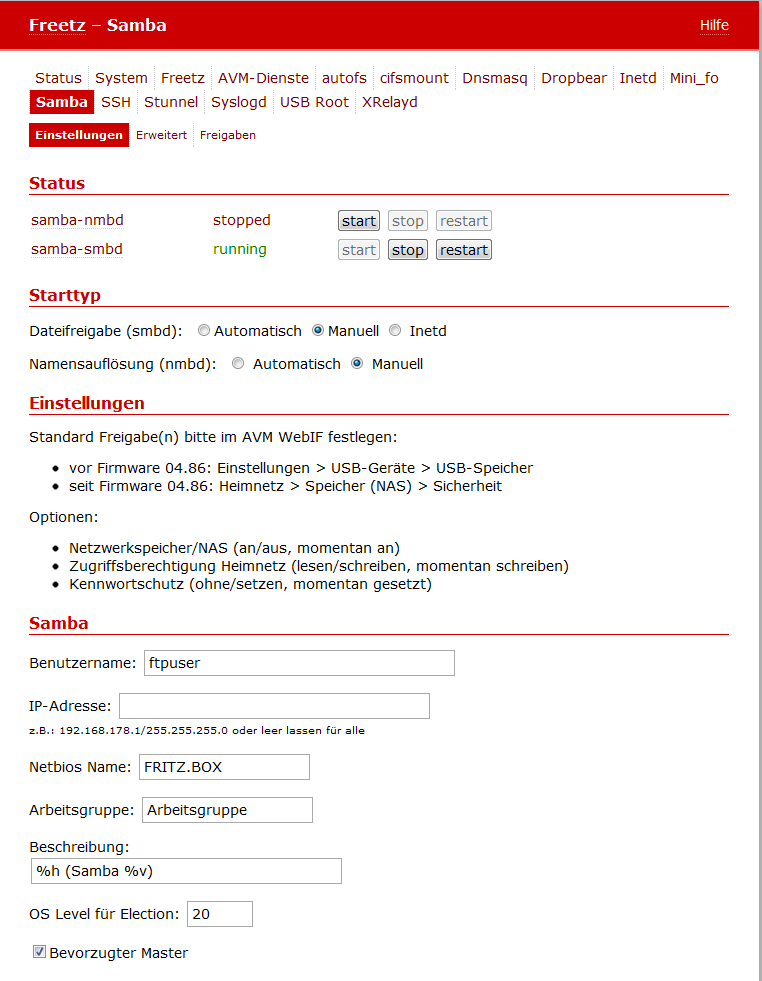
Packages -> Samba⚓︎
- Workgroup
the server becomes visible in the Windows network neighborhood under
this workgroup - Server name
the server's name in its workgroup - Server description
its additional description - Options for the Master Browser
If several Windows systems are present in the same network segment,
one of them takes over the task of maintaining a list of available
systems. The following parameters determine whether the FritzBox takes
over this task and becomes the Master Browser. Details at
http://us3.samba.org/samba/docs/using_samba/ch07.html#samba2-CHP-7-TABLE-2- OS Level for election
With the default value of 20, the FritzBox almost always becomes
Master Browser. - Preferred master
If this is selected, the FritzBox tries after booting to replace
any existing Master Browser.
- OS Level for election
- Selection of the network interface
This specifies the network segment for which the box provides file
sharing. It can be left empty. Then file sharing applies to all
network segments in which the box is located.
/!
Attention: If the box is directly connected to the internet, make
sure that the internal firewall is in order. Otherwise this could open
an attack possibility from the entire internet. - Startmodus
Either automatic or manual can be selected here. (TODO: Is
smbd also started by the hotplug scripts?)
Settings -> Samba Shares⚓︎
In addition to USB storage, which automatically creates a share when
connected, static shares can be defined here. For example, the FritzBox
filesystem or selected directories of the USB storage can be made
available as independent shares.
The following can be configured:
- Path: The FritzBox-internal path of the directory that is shared.
- Name: The share is visible to Windows under this name.
- guest ok: 1: Specifies that this share can also be accessed
without a password. The password is defined in the FritzBox
configuration. - read only: 1: This share can only be accessed read-only. 0:
read and write access. - comment 1: -: Description follows.
- comment 2: Description / comment that Windows displays with this
share.
Example:
/var/media/ftp/uStor01/Videos hdd1 1 0 - Videos
/var/media/ftp/uStor01/Bilder hdd1 1 0 - Bilder
/var/media/ftp/uStor01/Musik hdd1 1 0 - Musik
When using USB storage, note that the access rights must be set
accordingly. If the storage was formatted on another computer, for
example with ext2 or ext3, write permissions are often missing and
ftpuser is also not set as owner. On the FRITZBox, this can be
corrected with the following commands:
Settings -> Samba Advanced⚓︎
Experts can let loose here and define arbitrary global options for Samba:
the entered text is inserted verbatim at the end of the [global]
section in the Samba configuration. Details at
http://samba.org/samba/docs/using_samba/ch06.html
Further tuning options can be found here:
http://lug.krems.cc/docu/samba/appb_02.html
For performance improvements, the following can be entered under
'Advanced':
socket options = TCP_NODELAY IPTOS_LOWDELAY
read raw = yes
write raw = yes
oplocks = yes
max xmit = 65535
dead time = 15
getwd cache = yes
Non-experts can simply leave this setting empty.
If a BSOD occurs with Windows 7 64-bit, set "oplocks = no"; see
IPPF.