Privoxy 4.1.0⚓︎
- Homepage: https://www.privoxy.org
- Manpage: https://www.privoxy.org/user-manual/
- Changelog: https://www.privoxy.org/gitweb/?p=privoxy.git;a=blob;f=ChangeLog
- Repository: https://www.privoxy.org/gitweb/?p=privoxy.git
- Package: master/make/pkgs/privoxy/
- Steward: @fda77
Privoxy is an HTTP proxy with extensive filter
options for protecting privacy and filtering website content: Privoxy
removes ads and popups, offers fully configurable access control
for the internet ("parental controls"), and manages and controls cookies.
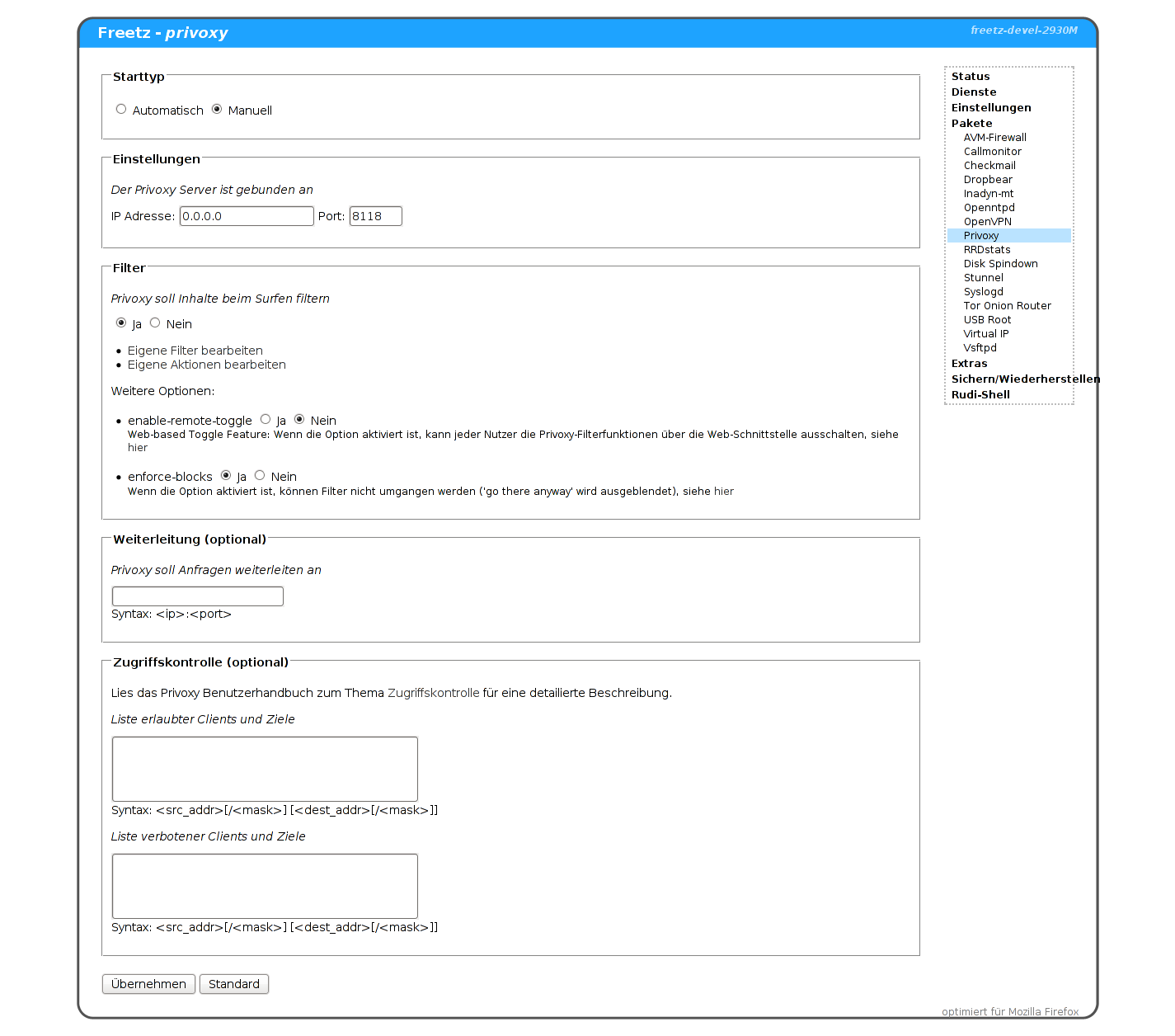
In addition to a precompiled Privoxy with default configuration, the
Privoxy package contains predefined standard filters and a web frontend
for configuration. The image below shows the version starting with
revision 2938; the options enable-remote-toggle and enforce-blocks were
newly added.
Filters and Actions⚓︎
The Privoxy user manual provides a
detailed description of the powerful and extensive filter functions in
the chapters Filter
Files
and Actions
Files
(English).
Access Control⚓︎
Privoxy access control can be controlled through the Freetz web
interface. A detailed description can also be found in the
Privoxy user manual in the chapter
Access Control
(English).
Privoxy and Tor⚓︎
Privoxy is also ideal for use together with Tor, in order to
browse the internet anonymously and securely.
For this, the port and IP address of the Tor proxy server must be entered
in the Privoxy configuration. If the Tor proxy runs on the same Fritzbox,
for example, 127.0.0.1:9050 can be entered.
Transparent Proxy⚓︎
In some cases it is desirable for all web traffic to be routed through
the proxy and filtered without configuration on the client PC. This also
requires Iptables with the modules ip_tables,
iptable_filter, x_tables, xt_tcpudp, ipt_REDIRECT,
ip_nat, and iptable_nat.
To activate the redirect, run the following (console or rc.custom):
modprobe ip_tables
modprobe iptable_filter
modprobe x_tables
modprobe xt_tcpudp
modprobe ipt_REDIRECT
modprobe ip_nat
modprobe iptable_nat
iptables -t nat -A PREROUTING -p tcp -i lan --dport 80 -j REDIRECT --to 8118
[ -z "$(grep accept-intercepted-requests /var/mod/etc/privoxy/config)" ] && echo "accept-intercepted-requests 1" >> /var/mod/etc/privoxy/config
Ad Filter⚓︎
To use Privoxy as an ad filter, it is necessary to have an up-to-date and
good filter list. To avoid maintaining the data yourself, it is helpful,
for example, to use the filter lists of the Firefox plugin AdBlockPlus.
Since these lists are quite large, things get a little tight in the flash
memory of the Fritz.Box. Therefore, it is useful to reload the lists when
the Fritz.Box starts.
URL="http://adblockplus.mozdev.org/easylist/easylist.txt"
ACTION=/var/tmp/flash/privoxy/user.action
FILTER=/var/tmp/flash/privoxy/user.filter
FILE=$(basename ${URL})
LIST=${FILE%.*}
wget -qO ${FILE} ${URL}
echo -e "{ +block{${LIST}} }" > ${ACTION}
sed '/^!.*/d;1,1 d;/^@@.*/d;/$.*/d;/#/d;s/././g;s/?/?/g;s/*/.*/g;s/(/(/g;s/)/)/g;s/[/[/g;s/]/]/g;s/^/[/&:?=_]/g;s/^||/./g;s/^|/^/g;s/|$/$/g;/|/d' ${FILE} >> ${ACTION}
echo "FILTER: ${LIST} Tag filter of ${LIST}" > ${FILTER}
sed '/^#/!d;s/^##//g;s/^#(.*)[.*][.*]*/s|<([a-zA-Z0-9]+)s+.*id=.?1.*>.*</1>||g/g;s/^#(.*)/s|<([a-zA-Z0-9]+)s+.*id=.?1.*>.*</1>||g/g;s/^.(.*)/s|<([a-zA-Z0-9]+)s+.*class=.?1.*>.*</1>||g/g;s/^a[(.*)]/s|<a.*1.*>.*</a>||g/g;s/^([a-zA-Z0-9]*).(.*)[.*][.*]*/s|<1.*class=.?2.*>.*</1>||g/g;s/^([a-zA-Z0-9]*)#(.*):.*[:[^:]]*[^:]*/s|<1.*id=.?2.*>.*</1>||g/g;s/^([a-zA-Z0-9]*)#(.*)/s|<1.*id=.?2.*>.*</1>||g/g;s/^[([a-zA-Z]*).=(.*)]/s|1^=2>||g/g;s/^/[/&:?=_]/g;s/.([a-zA-Z0-9])/.1/g' ${FILE} >> ${FILTER}
echo "{ +filter{${LIST}} }" >> ${ACTION}
echo "*" >> ${ACTION}
echo "{ -block }" >> ${ACTION}
sed '/^@@.*/!d;s/^@@//g;/$.*/d;/#/d;s/././g;s/?/?/g;s/*/.*/g;s/(/(/g;s/)/)/g;s/[/[/g;s/]/]/g;s/^/[/&:?=_]/g;s/^||/./g;s/^|/^/g;s/|$/$/g;/|/d' ${FILE} >> ${ACTION}
echo "{ -block +handle-as-image }" >> ${ACTION}
sed '/^@@.*/!d;s/^@@//g;/$.*image.*/!d;s/$.*image.*//g;/#/d;s/././g;s/?/?/g;s/*/.*/g;s/(/(/g;s/)/)/g;s/[/[/g;s/]/]/g;s/^/[/&:?=_]/g;s/^||/./g;s/^|/^/g;s/|$/$/g;/|/d' ${FILE} >> ${ACTION}
More information at:
http://andrwe.org/doku.php/scripting/bash/privoxy-blocklist
If you want to store the action and filter file external in stead of
flash:
rm /tmp/flash/privoxy/user.filter
rm /tmp/flash/privoxy/user.action
ln -s /var/media/ftp/uFlash/privoxy/user.filter /tmp/flash/privoxy/user.filter
ln -s /var/media/ftp/uFlash/privoxy/user.action /tmp/flash/privoxy/user.action
modsave
Installation⚓︎
The package can simply be selected during
Freetz installation, making it part
of the self-built firmware.
Discussion⚓︎
Questions and comments about this package are discussed in this
thread.