davfs2 1.5.2/1.7.3⚓︎
- Homepage: https://savannah.nongnu.org/projects/davfs2
- Manpage: https://linux.die.net/man/5/davfs2.conf
- Changelog: https://github.com/alisarctl/davfs2/releases
- Repository: https://github.com/alisarctl/davfs2
- Package: master/make/pkgs/davfs2/
- Steward: @fda77
Package from the thread: WebDAV-to-mountpoint for the
Fritz!Box
Introduction⚓︎
What Is WebDAV?⚓︎
WebDAV is an open standard based on the
HTTP/1.1
protocol and extends it so that files can not only be retrieved, but also
created and replaced. Users can access their data as if on an online hard
drive. Well-known examples are Apple's iDisk and the MediaCenter services
from GMX (1 GB storage is free when registering for the FreeMail service)
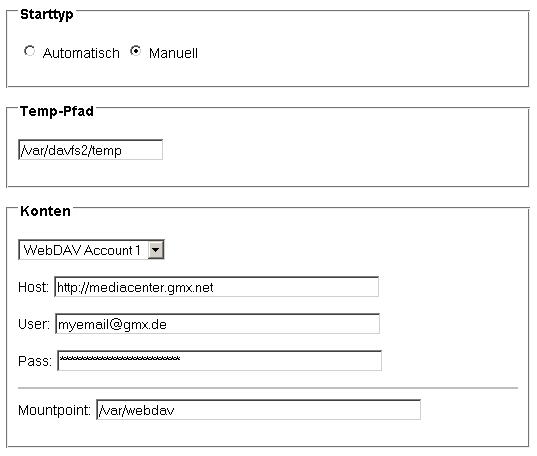
and 1&1. The WebDAV package provides a graphical interface through which
settings can be made.
What Is davfs2?⚓︎
The WebDAV package in Freetz uses davfs2, a Linux filesystem driver that
allows a WebDAV share to be mounted as a local volume.
(Source and further information:
http://dav.sourceforge.net/).
Applications⚓︎
- Directly starting software from the WebDAV server without elaborate
reloading via wget - Providing WebDAV storage space in the LAN with the help of
Samba
Build the Package into the Firmware⚓︎
Select the davfs2 package under menuconfig:
Encryption with Certificates⚓︎
Many WebDAV sites (for example 1&1, Alice, GMX) use encryption (https)
with certificates. To enter these certificates in the WebDAV Freetz GUI,
proceed as follows (example: GMX Mediacenter with Firefox 3.x):
- Open
https://webdav.mc.gmx.net - An error message ("Not found") may appear; ignore it.
- In Firefox, open the page information under Tools.
- In the new page information window, click "View certificate" under
"Security", then click "Details". - Under certificate hierarchy there are 2 entries:
- Thawte Premium Server CA
- mediacenter.gmx.net
- Only the CA certificate, that is Thawte Premium Server CA, is needed.
Export it and paste it into the WebDAV Freetz GUI (copy & paste; pay
attention to line breaks). The Thawte CA is also sufficient for 1&1
and Alice.
Alternatively, it can also be
downloaded
from Thawte.
Since 2012-05-28, there have been error messages when accessing GMX.
Updating the certificate fixes this.
The certificate file /tmp/flash/davfs2/servercrtX.pem can also be
linked to /etc/default.Fritz_Box_7390/avm/root_ca.pem; AVM keeps some
certificates there.
The certificate can also be printed on the PC with the following command
(adjust the address in the first line):
TARGET=www.box.net:https
openssl s_client -showcerts -connect $TARGET < /dev/null 2> /dev/null | sed -n '/^-----BEGIN CERTIFICATE-----$/,/^-----END CERTIFICATE-----$/{/BEGIN /h;/BEGIN /!H};${g;p}'
Settings / Options⚓︎
Additional options can be enabled or disabled here:
- Disable use-locks
If the use-locks option is enabled, files on the server are locked
when they are opened for writing (default). This behavior can also be
disabled, meaning the checkbox before "Disable use-locks" must be set
in the Freetz GUI. - Enable if_match_bug option
The "if_match_bug" option must be enabled for GMX and 1und1, for
example, otherwise files cannot be uploaded. Some servers do not
process If-Match and If-None-Match headers correctly. The enabled
option causes mount.davfs to use HEAD instead.
Further Threads in IPPF⚓︎
- Mounting a second online storage via WebDAV davfs2.conf, davfs2.secrets and mtab
- WebDAV and SSL
- WebDAV and http://mediacenter.gmx.net
- freetz-dev-3306: davfs2_1.conf statt davfs2.conf + ...secrets failed
- WebDAV: davfs2_1.conf <> davfs2.conf
- WebDAV to mount point for the Fritz!Box
- WebDAV to network drive implementation on the FritzBox