Point-to-Point⚓︎
- Package: master/make/pkgs/ppp/
- Steward: -
Originated from this thread in IPPF:
http://www.ip-phone-forum.de/showthread.php?t=201519
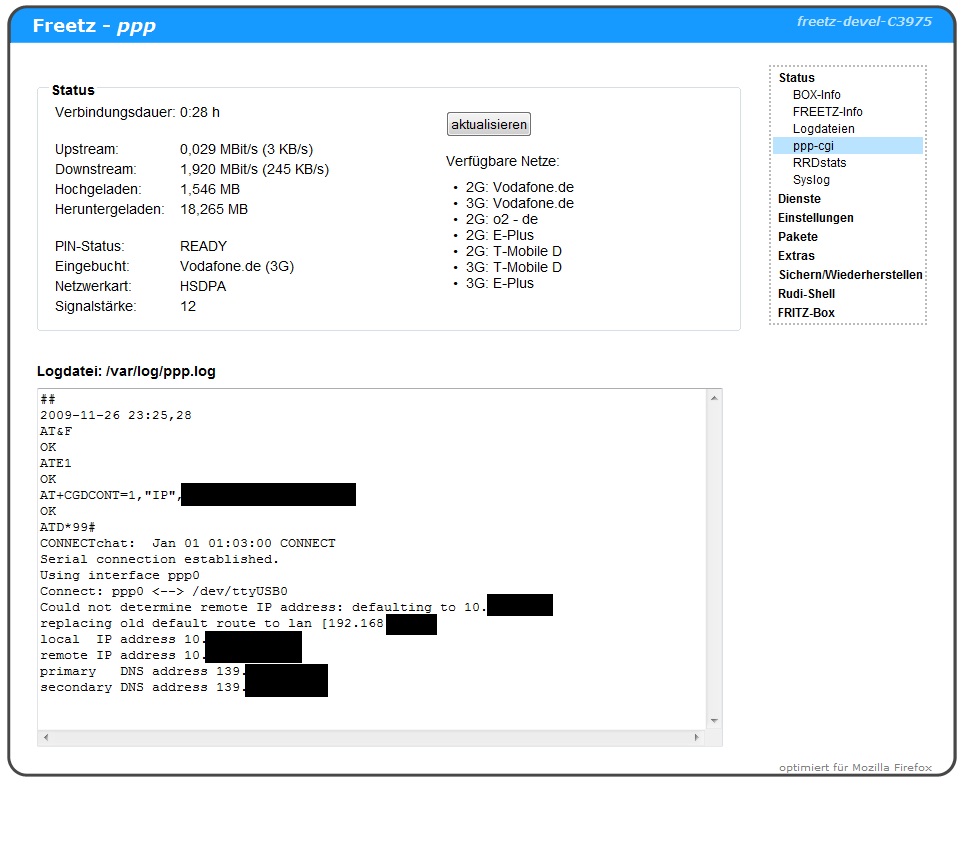
With "ppp-cgi", a dial-up network connection can be established through a
serial interface. USB modems for UMTS provide such an interface.
General Configuration⚓︎
found in the web interface under "Packages" > "PPP"
Start Type⚓︎
If "automatic" is selected, the connection is established immediately
when the box starts, or by fallback after failure of the DSL/ATA internet
connection.
Log File⚓︎
The path to the log file can be specified here. It can be viewed in the
Freetz web interface under "Status". It is recommended to change the path
to a persistent location so the file is not lost when the Fritzbox is
rebooted.
Configuration for UMTS⚓︎
PEERS: chat⚓︎
The required Access Point Name (APN) must be entered here instead of
"your.personal.apn".
PEERS: options⚓︎
The port (default: /dev/ttyUSB0) can be changed here, and the username
and password can be specified if required.
Command TTY⚓︎
Optionally, the 2nd port of the modem can be entered here (usually
/dev/ttyUSB1). Status information such as available networks is retrieved
through it and displayed on the status page. If the field remains empty,
the complete status box is not displayed.
Mode⚓︎
Optionally, the desired connection mode can be selected here.
Name Resolution⚓︎
For dynamically switching name resolution between mobile radio and a
conventional connection, the following is recommended:
-
For dnsmasq, enter this in the field "Additional command-line options
(for experts)": -
alternatively, if OpenDNS is preferred
Firewall, Routing & NAT⚓︎
To activate masquerading, the following commands are required:
modprobe ipt_state
modprobe ipt_MASQUERADE
iptables -A INPUT -m state --state ESTABLISHED,RELATED   -i ppp0 -j ACCEPT
iptables -A INPUT                                        -i ppp0 -j DROP
iptables -A FORWARD -m state --state ESTABLISHED,RELATED -i ppp0 -j ACCEPT
iptables -A FORWARD                                      -i ppp0 -j DROP
iptables -t nat -A POSTROUTING                           -o ppp0 -j MASQUERADE
This requires the iptables modules state and MASQUERADE.
- These make (made?) boxes with the old kernel 2.6.13.1, such as the
7170, reboot after a certain time; see Ticket
Ticket #260
The commands can be entered in debug.cfg or rc.custom. However, it is
advantageous to have them executed by the ppp-cgi scripts, to undo them
again after disconnection, and above all to unload the modules again.
Fallback⚓︎
- This feature is still experimental. Malfunctions and high costs cannot
be ruled out.
When fallback is enabled, the DSL/ATA internet connection is checked
every X seconds using the hosts specified with spaces, and after Y
seconds without a response the ppp connection is established. A route is
set up to the host "check for restoration" to detect when the DSL/ATA
internet connection is available again. Because this route is created,
the corresponding IP cannot be reached via the ppp connection.
Driver Problems⚓︎
The driver module option is loaded automatically at startup. However,
it may be necessary to load it with custom parameters, for example with
usbserial vendor=0xYYYY product=0xZZZZ in Freetz: modules.
What Else Should Be Considered? (2do List)⚓︎
- At the moment, only SIMs with disabled PIN query can be used. This is,
however, possible with the gcom package.
Miscellaneous⚓︎
Deactivate the integrated CD-ROM on Huawei sticks with a one-time
at^u2diag=0 sent to the stick's 2nd virtual serial interface (usually
/dev/ttyUSB1 under Linux), or at^u2diag=1 to enable it again.