Product Name and History⚓︎
What is Freetz?⚓︎
Freetz is a toolkit for developers and advanced users that can be
used to build functionally modified firmware based on the vendor's
original firmware for various DSL/LAN/WLAN/VoIP routers in the
AVM Fritz!Box
and T-Com Speedport
series, which are structurally similar, and to transfer that firmware
to the device. Many extension packages are offered, as well as options
to remove unneeded functionality from the original firmware.
Where does the name Freetz come from?⚓︎
It is a playful combination of the English word "free" and the male
given name "Fritz", which is meant to recall the device name used by
AVM. We use it to symbolize that Freetz is free
software. Because we want to avoid trademark and copyright problems
with AVM, whose rights to the "Fritz!" mark, including the exclamation
mark, we expressly acknowledge, we chose this clearly different
spelling. The idea for the name came from Alexander Kriegisch, who,
together with Oliver Metz, considered what the project should be called
when the version-controlled source-code repository was handed over to
the public. The alliteration "Free Fritz", which sounded silly to us,
eventually became "Freetz". "OpenFritz" was also in the running, but
we did not want to imitate OpenWrt. We do not
imagine that the name is a stroke of genius, but it is short and we
hope it is easy to remember. :-)
How is Freetz pronounced?⚓︎
Like the English word "free" with a German "tz" appended, written in a
pseudo-German way roughly as "Friez" and in a pseudo-English way
roughly as "freets". In other words, like the male given name "Fritz",
but with a long "i" and an English-pronounced "r".
How did Freetz originate?⚓︎
There are several predecessors of Freetz. Several years ago Daniel
Eiband, known as "Danisahne", built on the preliminary work and
contributions of other creative minds such as Erik Andersen, Christian
Volkmann, Andreas Buehmann, Enrik Berkhan and others, and started the
so-called Danisahne-Mod, abbreviated DS-Mod. As with Freetz
today, firmware modifications could and can be built with it, although
only for older firmware versions using Linux kernel 2.4. Because some
routers still have firmware based on kernel 2.4, version
ds-0.2.9-p8
of DS-Mod is still current for those devices. For most current
devices, however, the direct predecessor of Freetz was the ds26
version started by Oliver Metz, most recently
ds26-15.2,
which is suitable only for firmware with kernel 2.6. The same applies
to Freetz, because as of today, January 20, 2008, Freetz is
nothing other than the current development version of ds26, only with
a new name.
Why a new name at all, when DS-Mod is already so well known?⚓︎
There are several reasons. First, Daniel had not been actively involved
in further development of ds26 for about a year. Second, for roughly
the same length of time he had already started developing a completely
new DS-Mod version at SourceForge, which
we will informally call DS-Mod NG (Next Generation). Its current
state can be viewed in a public source-code repository on the
project website. We do not want to
dispute Daniel's project name or compete with him. On the contrary, we
hope that one day he will again have more time for his project and that
both projects will ultimately merge into one again, combining all
advantages in a single product. At the moment, however, the two
projects have developed in clearly different directions: DS-Mod NG
has a very clean structure but is still far from finished, while
Freetz, previously ds26, is in use hundreds of times and tends to
undergo refactoring repeatedly during ongoing development. When the
press recently spoke about DS-Mod, for example
PC-Welt,
it meant Freetz, also known as ds26.
Motivation⚓︎
Why modify firmware?⚓︎
Individual special files, character devices, under /var/flash/ can be
edited and retain their contents across a reboot, but this does not
apply to the rest of the filesystem. The contents of these character
devices end up in a dedicated flash partition that is very small. Most
of the filesystem is a read-only Squashfs image contained in a firmware
update. To permanently include larger files in the firmware, they must
be placed into this Squashfs image, something implemented in Freetz
among other places.
Distribution⚓︎
Why are no ready-made modified images offered?⚓︎
The license under which AVM provides its firmware prohibits this.
Where can FREETZ be downloaded?⚓︎
On the start page, the source-code section lists the available options
for downloading FREETZ. Both tested stable versions of FREETZ and
development versions are offered. LINUX is strictly required to build a
FREETZ image. A native Linux system does not necessarily have to be
installed on the PC already. A virtual machine of your choice or a live
CD with Linux can also be used to build FREETZ.
Which boxes and which firmware versions are supported by Freetz?⚓︎
Development⚓︎
When will version xy be released?⚓︎
In general: It's done when it's done. The developers work in their free
time, and releases are made when the agreed features are complete and
release-critical bugs have been fixed.There is, however, a rough release plan: 3-4 months after a stable
release, there is a feature freeze for the following release. From that
point on, only bugs are fixed. The feature-freeze dates are announced
in the Roadmap. After the feature freeze, the release can
roughly be expected after 1 to 1.5 months. Between stable feature
releases there may also be additional maintenance releases that only
support new AVM firmware versions and fix bugs.
When will feature XY be finished?⚓︎
The fastest way to get it finished is to present a working solution. We
note every feature request that appears meaningful. But because we work
on Freetz in our free time, sometimes patience is required.
I like Freetz and would like to support further development.⚓︎
One option is to send the developer team a monetary donation. A PayPal
donation button is available in the lower right corner for this
purpose. A box can also be supported better if the developer team owns
"test boxes". In the
IPPF
there is a thread about donations.
Preconfiguration (menuconfig)⚓︎
How do I recognize which variant of the 7270 I own?⚓︎
See here.
Which packages should sensibly be included in a Freetz image?⚓︎
Dropbear is useful for later SSH access, dnsmasq as a replacement DNS
and DHCP server, and the Syslog WebIF to identify errors.
What does "binary only" mean?⚓︎
"binary only" means that only the program itself, the binary, is built
for the selected package, and that no web interface, init scripts and
so on are available. This means that you must take care of configuring
and starting the program yourself.
What does "EXPERIMENTAL" or the "unstable" category mean?⚓︎
Packages marked this way have known problems and cannot or should not
be used. There may still be an open ticket for them.
Do iptables/nat/conntrack work?⚓︎
IPtables works everywhere. However, in Fritz!OS 05.2x and 05.5x AVM
uses the PacketAccelerator. Because of it, conntrack no longer works.
That also means nat/masquerading/state/transparent proxy and everything
else that depends on conntrack no longer work. A downgrade to old
firmware helps, for example an "Alien" with 04.88 for the 7270 or
Freetz-1.2 directly. Because AVM has published the source code of the
PacketAccelerator, someone with a lot of time and knowledge could fix
the problem. The topic is handled in ticket
Ticket #1605 "defect: iptables/nat/conntrack & kernel 2.6.28/2.6.32 (new)",
and as long as that ticket is not closed, the problem remains.
Packet Accelerator (AVM PA)⚓︎
The Packet Accelerator also has the disadvantage that tcpdump and
similar tools no longer see all packets. To temporarily disable PA
until the next reboot:\
echo disable > /proc/net/avm_pa/control\
This has the disadvantage that, for example, the 7390 can no longer
route 100 Mbit/s in ATA mode and only reaches about ~ 40 Mbit/s. See
also 'Do iptables/nat/conntrack work?'
What does "not available, no sources by AVM" mean?⚓︎
The kernel sources matching this firmware have not yet been integrated
into Freetz. Usually the reason is that AVM has not yet published them.
Typically this takes anywhere from a few days to several months. If the
file for the corresponding FritzBox has meanwhile been published at
ftp://ftp.avm.de/, open a ticket for it. To speed
up the process, it is recommended, as described in
info.txt,
to contact AVM in writing atfritzbox_info@avm.de.
Creating Firmware Images (make/build)⚓︎
What do the individual make targets mean, for example dirclean, distclean, config-clean-deps and so on?⚓︎
A: The make targets influence the build process when creating firmware.
Much of the following information comes from
(this thread).
1. Cleaning up:
- make clean\
...
- make \<package>-clean:\
usually calls the clean target of the source Makefile. This
typically deletes all generated files, especially object files,
libraries and executable programs. A subsequent make does not
apply changed patches, but only rebuilds the above-mentioned object
files, libraries and executable programs by compiling them. For
example, make mc-clean cleans up the "Midnight Commander" (mc)
package this way.
- make \<package>-dirclean:\
deletes the entire package directory. A subsequent make unpacks
the sources again, applies the patches, configures the package and
then compiles it. Only the last step, compiling, is carried out after
make \<package>-clean, see above.
- make dirclean:\
performs, as the name says, a "directory cleanup". Among other
things, the directories /packages, /source, /build,
/toolchain/build, toolchain/target and a few other things (?) are
deleted, so everything has to be rebuilt the next time make is
run. This is recommended if, after an svn up, a newly built
firmware does not behave as expected. Alternatively, if you know
which package is responsible, you can delete only that package with
make \<package>-dirclean, see above. It should also be mentioned
that after make dirclean the firmware build naturally takes longer
because everything has to be rebuilt.
- make tools-distclean:\
deletes the tools, such as busybox, lzma, squashfs and so on.
- make distclean:\
additionally deletes the downloads and tools on top of make
dirclean.
- make config-clean-deps:\
If packages were deselected in make menuconfig, shared libraries
may still be selected although they are no longer needed; menuconfig
cannot detect this automatically. These can then be deselected
manually under 'Advanced Options' -> 'Shared Libraries' - the
required ones cannot be disabled. Alternatively, this can be done
automatically with make config-clean-deps. This also deselects
Busybox applets manually selected in make menuconfig, but not the
applets selected in make busybox-menuconfig. In other words, the
Busybox settings are reset to default values.
- make config-clean-deps-keep-busybox:\
Like make menuconfig, but the Busybox settings are kept.
- make kernel-dirclean:\
deletes the currently unpacked source tree of the kernel in order to
compile from completely clean kernel sources. This is important when
something in the patches is changed.
- make kernel-clean:\
analogous to make \<package>-clean.
- make kernel-toolchain-dirclean:\
deletes the kernel compiler.
- make target-toolchain-dirclean:\
deletes the compiler for uClibc and the binaries, meaning executable
programs.
2. Preparations:
- make world:\
A toolchain is required, see 'Creating a cross compiler / toolchain'.
If problems with missing directories ever appear, make world can
help. Usually this should not be necessary, however.
- make kernel-toolchain:\
compiles the kernel and also for the target (Fritzbox).\
For historical reasons the name kernel-toolchain was kept, even
though, as mentioned, it builds not only the kernel but also packages
(see below).
- make target-toolchain:\
compiles the packages for the target (Fritzbox).
- make kernel-menuconfig:\
The kernel configuration is then saved back to
./make/linux/Config.\<kernel-ref>.
- make kernel-precompiled:\
This compiles the kernel and the kernel modules.
- make menuconfig
(source): Freetz is configured using the conf/mconf program, which
some people may know from configuring the Linux kernel. The
ncurses variant mconf can
be started with the make menuconfig command.
[By the way]{.underline}:\
Help for the individual items can be opened directly in menuconfig
by entering "?". And after entering "/", you can search from all
levels for arbitrary strings - very practical.
An error occurs while building. What now?⚓︎
First, go through the following list of common errors:
You must have either have gettext support in your C library, or use the GNU gettext library.⚓︎
A wrong value probably ended up in the cache and must be deleted: "rm
make/config.cache" or "rm source/target-mipsel_uClibc-0.X.XX/config.cache",
depending on where the file is located. After that, start the firmware
build again with "make".
ERROR: The program/library/header xy was not found...⚓︎
If the first messages look like this, packages that are absolutely
required for building Freetz are missing from the build system and must
be installed first.
WARNING: The program/library/header xy was not found...⚓︎
If the build aborts with an error, this warning at the beginning of the
process can indicate that packages required by certain selected options
are missing from the build system.
Could not download firmware image⚓︎
(formerly: No such file `FRITZ.Box_xxxxxxxxx.aa.bb.cc.image')⚓︎
For a box type, AVM itself usually only provides the latest firmware
image for download. Each Freetz version only supports the versions
listed in theFIRMWARESfile. For licensing reasons, the Freetz
project is not allowed to provide AVM firmware. Suggested solutions:
- General note: In the
firmware search collection thread
you can ask for older firmware versions. Copy the firmware image
manually into the folder'dl/fw/'in the Freetz directory. - Beginners: Always use the latest 'stable version' or try the preview
version. - Advanced users/developers: The development version usually supports
all current firmware versions. -
Experiment-oriented users: In 'make menuconfig', under
Advanced Options -> Override firmware source, adjust the name of
the image file to be downloaded. -
Additional changes in the source code may be necessary, and for
safety you should keep a matching recover image ready.
Please copy the following file into the 'dl/fw' sub-directory manually: fritz_box_aa_bb_cc-ddddd.image⚓︎
The lab firmware versions cannot be downloaded directly from the AVM
FTP server. They must be downloaded manually from the
AVM Lab page, where the terms of use must
be accepted. The files must then be unpacked and the image contained
in them copied into the 'dl/fw' folder in the Freetz directory. The
same information as in the previous question also applies here.
./ln: cannot execute binary file⚓︎
The current directory '.' is in the path, the PATH variable. It must be
removed for a successful build.
Filesystem image too big⚓︎
The firmware image does not fit into the flash memory of the selected
box.
- On some boxes this can already happen even if no additional packages
are selected at all, because the basic Freetz infrastructure already
takes up some space and the AVM images are already just below the
maximum size. In this case it is necessary to select one or more of
the remove patches under 'Patches' to remove unneeded components of
the original firmware. More details can be found in the
IPPF
and in the
WIKI. - If many packages are selected, you should limit yourself or try to
bypass the flash limitation with USBRoot or NFSRoot. - On boxes with a USB host, for example 7170 and 7270, individual
packages can also be moved to the external USB medium, for example a
USB stick or USB hard disk, in addition to USBRoot. After the make
process, the relocation is performed automatically by a script named
external. The menuconfig options for relocation with external can be
found there. Unlike USBRoot, this does not relocate the whole
firmware, but only part of the packages. - If packages were deselected, shared libraries may still be selected
although they are no longer needed; menuconfig cannot detect this
automatically. These can then be deselected manually under
'Advanced Options' -> 'Shared Libraries' - the required ones cannot
be disabled. Alternatively, this can be done automatically with
make config-clean-deps or make config-clean-deps-keep-busybox.
WARNING: Not enough free flash space for answering machine!⚓︎
Unlike the message "Filesystem image too big", the firmware image does
fit into the flash memory of the selected box, but the remaining space
in flash may be too small or completely missing for recording messages
on the answering machine integrated into the firmware by AVM. The
firmware should work despite this warning. For answering-machine data,
fax messages and other things, it is recommended to create a stick with
a FAT partition and configure the AVM WebIF accordingly so that the
answering machine or other services use the external storage.Background information: Since some firmware versions, AVM has tried to
use the remaining bytes in flash to create a jffs2 partition. On this
partition, for example, answering-machine messages (TAM), possibly
faxes and similar data are stored. On older boxes, for example 7170,
there is almost always so little free space left in the image that the
jffs2 partition is not created and the message should be regarded only
as a warning. More on this can be found in the
IPPF thread.
In FREETZ since revision Changeset r3049.
An error still occurs while building...⚓︎
First set the 'Verbosity Level' in menuconfig under 'Advanced Options'
to 2 and run make again. Then search the
IPPF forum
for the relevant error message and, if necessary, open a matching
existing or new thread asking for help. Include the complete error
message, please in code tags, the .config file as an attachment, and
the version or SVN revision used.
I cannot find the generated Freetz image.⚓︎
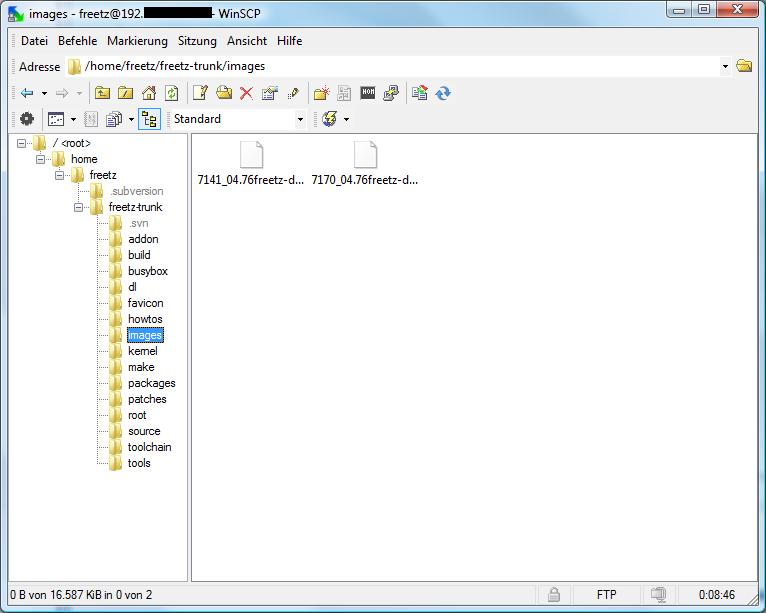
Freetz moves all finished images into the images/ subdirectory.
Where can I find this famous .config file?⚓︎
The .config file contains the main configuration for the make call when
cross-compiling the firmware. It is located exactly on the machine used
to generate the firmware, and exactly in the same main FREETZ directory
from which make is run. The file contains, for example, which
packages, branding, libraries and so on were selected. The .config file
is a plain text file and is typically created or updated automatically
after menuconfig is run. Please do not confuse this file with
Config.in, which is a common mistake. If you cannot see the file, it is
because it has a "dot" as its first character and is therefore hidden.Alternatively, the file can also be found in the self-built firmware
image, because .image files are nothing other than ordinary tar archives
that can be unpacked, for example, with WinRAR or 7Zip.More recently, the .config file is also included in the image, unless
this is explicitly deselected, and is present on the box in compressed
form. The file can be viewed and even downloaded through the FREETZ
WebIF. It can be found under Status -> FREETZ Info.
How do I get the .config file onto the PC?⚓︎
The .config can be copied to the PC very easily with
WinSCP.
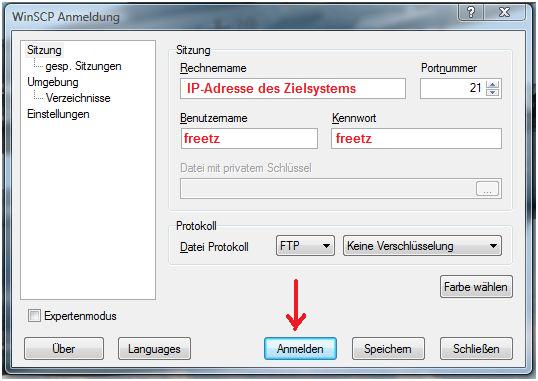
First install WinSCP on the PC and
start it. In the start screen, enter the following details, see the
image:
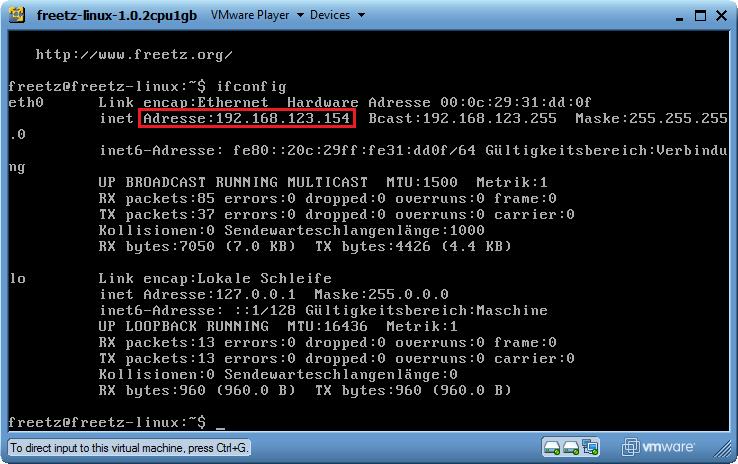
You can get the required IP address of your Freetz build environment by
entering the following command in the console: ifconfig
Username and password are, as usual, freetz freetz. For the
protocol use FTP (No encryption). When you now click Login, the
following image should be visible:
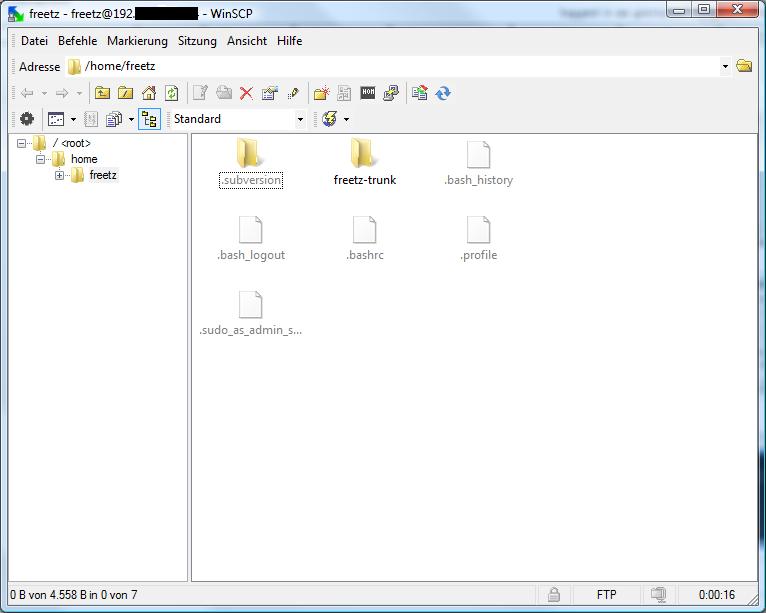
Next, change into the main FREETZ directory. In the example, this is
freetz-trunk.
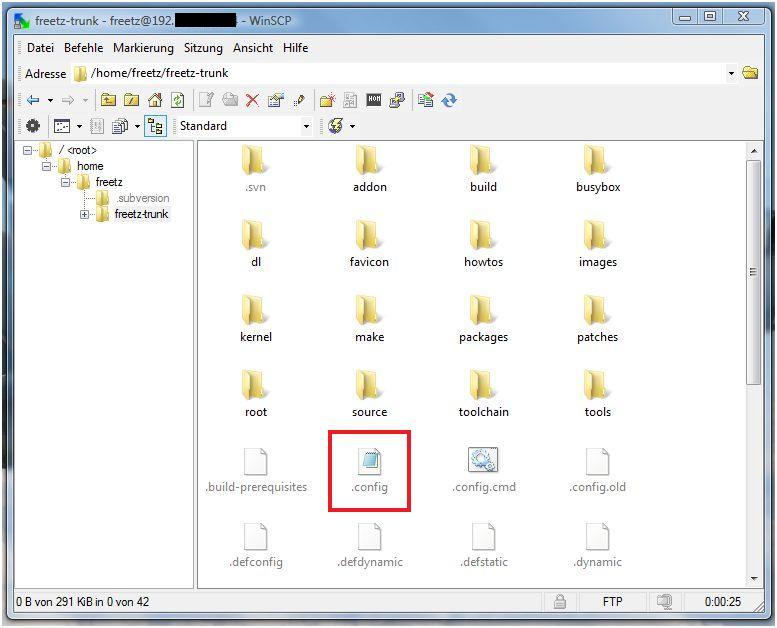
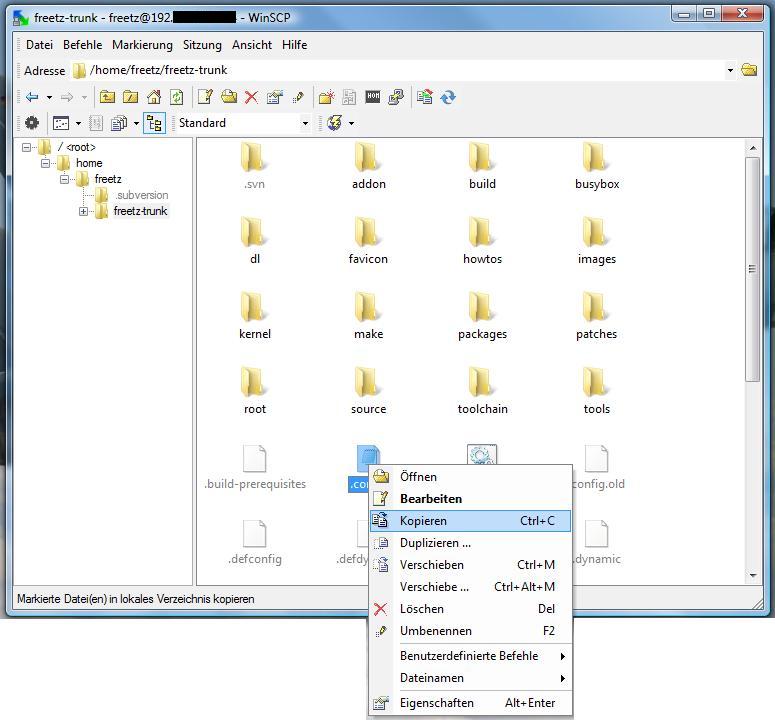
There, select the desired .config with the mouse, open the context menu
with the right mouse button and click copy:
In the next window, only select the target directory on the PC and click
Copy.
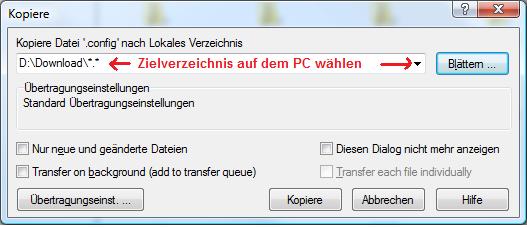
You should now find the .config on your PC.
Flashing the Firmware Image⚓︎
How do I install the Freetz image?⚓︎
If original AVM firmware is still installed, ...
there are two options:
- the normal installation through the AVM web interface, as usual for
an update - the tools/push_firmware.sh script, located in the Freetz build
directory, for example under "freetz-1.1.4". This can also be used
to install Freetz on Speedports, which is not so easy through the
web interface subsection:
"upload via web interface"
If Freetz is already on the box, ...
- the most convenient option is the firmware update through the Freetz
web-interface start page. If necessary, the AVM services can keep
running, so the internet connection remains active, or they can be
stopped to gain additional RAM space. The good thing about this
method is that after uploading the image you see a detailed report
and can then manually determine the reboot time, and thus the actual
update time.
**Flashing a Freetz image plus an
.external:\
**
In principle, Freetz must already be running on the box for this
function.
Both the .image file and the .external file, if one was created, can be
loaded onto the box in a single reboot process. The following procedure
is recommended:
- Upload the .external file. The system automatically tries to stop all
programs that have already been relocated. If an error occurs,
please stop all programs manually first. Background: During the
upload process, the contents of the old .external are overwritten by
the new one. - Upload the .image file.
- Trigger a box reboot.
During flashing, the AVM web interface reports that the image does not contain suitable firmware⚓︎
The branding configured in the box, in the bootloader, must also be
present in the firmware being used. Please check whether this is the
case and, if necessary, recreate the image with the correct branding.
Freetz trunk was flashed via AVM firmware update, but after reboot nothing seems to have changed⚓︎
If, after flashing Freetz via firmware update through the AVM web
interface and the subsequent reboot, the Freetz web interface is not
available on port 81 and the firmware version in the AVM web interface
has not changed either, flashing was probably not successful. A clear
indication is when the box reboots very quickly. Depending on the box
model and firmware size, flashing can take one to two minutes, during
which a status LED on the box blinks, just like during a normal
firmware update. The cause is probably a lack of free RAM on the box
during the update.
The following steps may help:
- First create an image without any packages, which is recommended
anyway, and, if necessary, reduce the size further with remove
patches. - Alternatively, download and compile the last stable version or
another older and hopefully smaller version. - Flash this version through the AVM web interface and reboot the box.
- Then flash the desired image through the Freetz web interface on port
81 and choose to shut down the AVM services. - After the flash process, check in the displayed log whether the
process was successful, and reboot the box through the Freetz web
interface. - After that, the desired image should have been flashed successfully.
Problems after successful flashing⚓︎
What is the default password for Freetz?⚓︎
The default password for Freetz, for both console and website login, is
'freetz'. The username for the console is 'root'; for the Freetz web
interface it is 'admin' by default. On the first login via Telnet,
user root, the password must be changed. The web interface displays a
notice if the default password is set. Please change the password for
your own security.
After flashing, the AVM web interface is no longer reachable⚓︎
If the OpenSSL libraries were included in the image, for example
because of OpenVPN, there are problems with TR069. It is then necessary
either to do without OpenSSL libs, to include them statically in the
respective packages, which wastes memory, to disable TR069, which only
works with older firmware, or to remove TR069 completely by patch,
which also works with current firmware.To disable TR069, the file /var/flash/tr069.cfg must be edited with
nvi, nmcedit or nnano. It should look like this:# cat tr069.cfg /* * /var/flash/tr069.cfg * Sun Sep 8 14:03:34 2002 */ tr069cfg { enabled = no; igd { ...With newer firmware versions, disabling TR069 is no longer enough.
Here, ctlmgr also crashes during other actions when accessing the
OpenSSL libs. Sometimes replacing libavmhmac helps, in menuconfig under
Advanced Options -> Shared Libraries -> Crypto & SSL -> Replace
libavmhmac, but even that is not sufficient with the newest firmware
versions and may lead to reboot loops. Under some circumstances, not
all functions work afterward either, such as FritzMini support, AVM's
Fritz-App and so on.To find out whether the problematic OpenSSL libs are included in the
image, run the following command:oliver@ubuntu:~/fritzbox/freetz/trunk$ grep -E "libssl|libcrypto" .config FREETZ_LIB_libcrypto=y FREETZ_LIB_libssl=yThe following is a list of packages that need the OpenSSL libs, some of
them only optionally: bip, curl, dropbear with sftp support, mcabber,
netsnmp, OpenVPN, Tor, transmission, Vsftpd and wgetThe affected packages can be built statically, meaning without external
OpenSSL libs. This is already possible for some packages, such as
OpenVPN and CURL. However, keep in mind that binaries become very large
because the OpenSSL libs then become part of the static binary. In this
case, it is advisable to relocate such packages with external, although
this does not change the higher memory requirement during operation.
Even if no package actually needs the OpenSSL libs anymore, they may
still be packed into the image. This happens because menuconfig does
not support automatic deselection. For this, use the command make
config-clean-deps or make config-clean-deps-keep-busybox.oliver@ubuntu:~/fritzbox/freetz/trunk$ make config-clean-deps Step 1: temporarily deactivate all kernel modules, shared libraries and optional BusyBox applets ... DONE Step 2: reactivate only elements required by selected packages ... DONE The following elements have been deactivated: FREETZ_BUSYBOX_BRCTL FREETZ_LIB_libcryptoCaution: As shown in the example, this also disables options that were
deliberately selected but are not enabled by default.
After flashing, the box is no longer reachable and/or constantly reboots⚓︎
This can have many different causes. First disconnect the box from DSL
and reboot it. If the problem no longer occurs, you most likely have a
conflict with TR069.If that did not help, the problem can be narrowed down by installing a
different firmware that does not contain the problematic function. In
principle, this will of course be the case with AVM's original
firmware. You can also try deactivating options and rebuilding Freetz
to find out what causes it. Because the web interface is no longer
reachable, an update must be performed another way. There are three
options:
- The tools/push_firmware.sh script. It can install arbitrary images.
- An AVM recover image. This installs original AVM firmware again.
- Update through the Freetz interface if only the AVM interface is not
reachable, which is common with TR069 conflicts.
When calling the original AVM web interface from outside, why do I only get a white page despite port forwarding?⚓︎
This is a 'security mechanism' by AVM that apparently checks whether
the hostname under which the box was called resolves to the box via a
reverse DNS query. Both internal hostnames such as fritz.box or
fritz.fonwlan.box and the DynDNS hostname or custom names, for example
assigned with dnsmasq, are accepted. If the name resolves incorrectly,
an empty page is shown. This is generally the case, for example, for
remote access to boxes in IP client mode, because here the box does not
know the DynDNS hostname and the external IP. The problem also occurs
if the IP of the box and any aliases in the exhosts file do not match,
which is sometimes a useful clue.There are at least 2 ways to work around these problems:
- Quick: Install a browser extension that allows the 'HTTP_REFERER' to
be suppressed. - Convenient: Start a dynamic SSH tunnel home, to localhost, for
example with 'Putty Portable', configure it in the browser as a
Socks5 proxy with remote DNS resolution, and use the LAN-internal
hostnames, including those from dnsmasq, and IPs. This has the
advantage that you only have to expose one SSH port to the outside
in order to access all TCP-based services of all devices at home,
regardless of whether they use HTTP, HTTPS or FTP and regardless of
which port. All LAN-internal bookmarks also work as they do at home.
To switch conveniently between direct and proxy access, the Firefox
plugin 'FoxyProxy' helps; it can also be installed on 'Firefox
Portable'. If you then also administer your box or boxes over HTTPS,
the connection cannot be intercepted locally on guest systems either.
This method works very well with dropbear as the server. The ssh
client from dropbear, however, unfortunately does not support dynamic
tunnels, although every Linux OpenSSH client does.
The Freetz web interface does not accept the default username and password combination (admin/freetz)⚓︎
In most cases it helps to delete the Freetz configuration and all other
mods. This can be done, for example, via a pseudo-firmware update using
tools/images/uninstall.image.
Can packages or patches be installed later without rebuilding the FREETZ image?⚓︎
No, this is normally not possible without further effort. After changing
the configuration under "menuconfig", a "make" should typically be run,
producing a new image as the result. This image then has to be put onto
the box via firmware update if you want your changes on the box. One of
the reasons for this is the special filesystem in the box's flash
memory. This filesystem resembles an archive file, is heavily
compressed and is specially optimized for flash memory. Changes in such
a filesystem are always tied to re-archiving and therefore require the
complete system to be rebuilt.There are exceptions to this rule, however:
- external. You can recompile only the binaries of the relocated
packages. This allows, for example, updating a package without
creating a new image. This method is very risky, however, because
external typically does not relocate all files. As a result, there is
always a risk of version differences between the relocated and the
permanently integrated contents of the same package. - USB-ROOT. Here, at least in theory, the complete filesystem,
typically ext2, could be changed "on the fly" without needing a
firmware update. However, it is also strongly recommended here to
mount the USB-ROOT system as "read-only" by default and make it
writable only briefly when needed, for example for an update.
After flashing, the Freetz web interface is not reachable anymore⚓︎
With firmware XX.05.05 (7240, 7270 V2, 7270 V3 and 7390), an AVM
daemon, contfiltd, occupies port 81, which is used by the Freetz web
interface. To regain access to the Freetz web interface, parental
controls must be disabled in the AVM web interface. Anyone who needs
this feature should move the Freetz web interface to another port. This
can be done through the web interface (Freetz -> Web Interface) or from
the command line (Telnet, SSH).
The dynamic part of the AVM web interface does not behave as expected⚓︎
If you update the firmware and make a version jump in the AVM part, for
example from 05.05 to 05.21 on the 7270v2 or from a lab version 05.06 to
05.21 on the 7390, the dynamic part of the web interface may not work
properly, for example JavaScript error "jxl.getFormElements is not a
funtion". This is especially noticeable under Internet -> Account
Information: When switching between the access options, the page should
actually adapt dynamically using JavaScript, but it does not. Therefore,
as a rule, after a firmware update, and especially when the web
interface appears suspicious, clear the browser cache!
Updating Freetz⚓︎
I currently have a lab version installed. Can I simply flash Freetz over it?⚓︎
It is advisable to recover the box first. Then install the latest final
release, if there is newer firmware than the recover image. In addition,
especially after updating from a lab version, clear the browser cache,
even if you used AVM Recovery on the box.
IMPORTANT: Before recovering, have at least the current access data
ready, or alternatively the start code. As a 1&1 customer, access data
can be found, for example, in the 1&1 Control Center under "Access
data".
I have old Freetz firmware on the box⚓︎
Update from Freetz version XY to Freetz version YZ:⚓︎
In this case, only a new Freetz has to be compiled or built. How to do
that is described here.
When AVM releases new firmware⚓︎
In this case Freetz also has to be rebuilt, but a Freetz version that
already supports this new AVM firmware must be used. Which firmware
versions are supported by which Freetz version can be read here:
Supported firmwares in the different Freetz versions
In this case it is recommended to check out Freetz again and compile it
completely from scratch for the new AVM firmware, instead of reusing an
"old" build environment. Even make distclean or make dirclean may
not be as effective as starting over from the beginning.
Configuration⚓︎
Where do the various configurations end up on the Fritzbox?⚓︎
All configurations on the Fritzbox are located under /tmp/flash. This
must be taken into account when building Freetz firmware, because the
configurations are therefore not in the fixed firmware part of the
image. Everything under /tmp/flash is therefore also not changed during
a firmware update, so the various configurations are preserved after a
firmware update. It is important to run the command "modsave" in the
console after changing configuration files under /tmp/flash so that
they are actually saved. More details follow below.
Configuration not available at the current security level!⚓︎
There are different security levels. Depending on the selected level,
not all configuration files can be changed. To change the security
level, execute the following commands directly in the box console via
Telnet or SSH. Unfortunately this cannot be done with the Rudi shell,
because it itself requires security level "0".Determine the current security level, here Freetz-1.1.4:
Freetz-1.1.x and older:
   echo 0 > /tmp/flash/security <--- Example #1: set level "0" (no restrictions, CAUTION!)
   modsave                      <--- Save the new security level
**From Freetz-1.2.x and SVN trunk
= Changeset r3318:**
   echo 1 > /tmp/flash/mod/security <--- Example #2: set level "1" (configuration files editable)
   modsave                          <--- Save the new security level
Allowed values with explanation, default: 2:
How do I disable the password for the Freetz website?⚓︎
Run the following commands on the console:
   touch /tmp/flash/webcfg_conf
   chmod +x /tmp/flash/webcfg_conf
   modsave flash
   /etc/init.d/rc.webcfg restart
Background: The script /tmp/flash/webcfg_conf is preferred over
/etc/default.webcfg/webcfg_conf for creating the configuration file. An
empty /tmp/flash/webcfg_conf script therefore creates an empty
configuration file without a password.
- For Freetz-1.1.x, replace /tmp/flash/webcfg_conf with /tmp/flash/httpd_conf.
How do I change the password for the Freetz website?⚓︎
This can be done through the
web interface
itself:http://fritz.box:81/cgi-bin/passwd.cgi
How do I change the password for the Freetz website if I have forgotten it and have Telnet/SSH access?⚓︎
First stop the Freetz WebIF:
Then use vi in the mod.cfg file to change the line that starts with
export MOD_HTTPD_PASSWD as follows:Save the change: press ESC once and enter
:wq.
Now start the Freetz WebIF again:You can now log in again with the password "freetz".
Please note that this change is NOT reboot-persistent. This means
that after a reboot you will again have the previous unknown password.
Therefore, before restarting the box, change or reset the password in
the Freetz menu under Settings.
How do I change the root password?⚓︎
Run the following commands on the console:
After entering the command 'passwd', the password must be entered. The
entered password is not displayed. Passwords that are too simple are
not accepted.
Changing the root password through the Rudi shell⚓︎
If you have forgotten the root password but still have access to the
web interface, a new password can be set through the Rudi shell:\
(echo neuespasswort; sleep 1; echo neuespasswort) | passwd
Why can I no longer log into the AVM WebUI after a Freetz restore?⚓︎
If a password is set for the AVM WebUI, it is stored as a hash in
ar7.cfg and is therefore also backed up. During restore, Freetz sets
the hash string itself as the password instead of the original
password. The
IP Phone Forum wiki
describes how the password hashes can be read via shell access.
Problems During Operation⚓︎
/var/flash/freetz too big⚓︎
The limit specified by Freetz for the maximum configuration size has
been exceeded. This limit is a safeguard to prevent accidentally
filling up the TFFS. The limit can be increased as follows, but you
should keep an eye on the TFFS fill level:
- Since Changeset r5706, setting the limit is no longer supported.
No FTP access after Freetz⚓︎
This is a problem that mainly occurs in Freetz 1.1.x and can be solved
as described in the how-to.
Removing Freetz and Other Modifications⚓︎
In the tools/images folder there is an uninstall image that is flashed
via the web interface like firmware and removes the configuration
files. Because this only removes the configuration files, original
firmware must of course still be installed afterward. The "update"
should be performed before a reboot, otherwise the configuration files
will be created again. The easiest way is via an AVM recover; files are
available for every box on the AVM FTP. This also deletes all Freetz
configuration files.
Miscellaneous⚓︎
Changing the workgroup from "freetz-linux"⚓︎
So that the virtual PC "FREETZ-LINUX" is shown in the network
environment under Windows 7 and Vista, the client and host PC must be in
the same "workgroup":\
- The first option would be to change the host PC's workgroup in
FREETZ. This is recommended for beginners.
- The second and nicer solution is to adjust the workgroup of the
virtual PC, meaning freetz-linux. Proceed as follows:\
Log in to freetz-linux\
Open smb.conf with:Then scroll down to workgroup and change the name there.
Save smb.conf with: "Ctrl+X"\Finally, restart Samba:
How do I find the IP of my virtual machine?⚓︎
The IP is displayed either when logging in on the start screen, red box,
or in the VM with the following command: ifconfig. After entering
ifconfig, the following output should be visible in the VM.
    eth0      Link encap:Ethernet  HWaddr 08:00:27:45:53:49
              inet addr:192.168.XXX.203  Bcast:192.168.XXX.255  Mask:255.255.255.0
              inet6 addr: XXXX::XXXX:XXXX:XXXX:XXXX/XX Scope:Link
              UP BROADCAST RUNNING MULTICAST  MTU:1500  Metric:1
              RX packets:454 errors:0 dropped:0 overruns:0 frame:0
              TX packets:155 errors:0 dropped:0 overruns:0 carrier:0
              collisions:0 txqueuelen:1000
              RX bytes:59413 (59.4 KB)  TX bytes:24972 (24.9 KB)
              Interrupt:10 Base address:0xd020

    lo        Link encap:Local Loopback
              inet addr:127.0.0.1  Mask:255.0.0.0
              inet6 addr: ::1/128 Scope:Host
              UP LOOPBACK RUNNING  MTU:16436  Metric:1
              RX packets:15 errors:0 dropped:0 overruns:0 frame:0
              TX packets:15 errors:0 dropped:0 overruns:0 carrier:0
              collisions:0 txqueuelen:0
              RX bytes:1122 (1.1 KB)  TX bytes:1122 (1.1 KB)
As shown in the excerpt, the VM received 192.168.XXX.203 as its IP
address. The IP can differ from system to system; it depends on the IP
range of your system. However, if no IP is displayed there at all, you
must check the settings of your PC or VM player again.