Checkmaild 0.4.7 - DEPRECATED⚓︎
- Package: master/make/pkgs/checkmaild/
- Steward: -
checkmaild makes it possible to check up to 3 email accounts (POP or
IMAP) for new mail at defined intervals. When a new mail is received, a
script (maillog.cfg) is called. In this script, the mail event can be
signaled, for example, by an LED on the FritzBox, or via a short phone
call to a telephone or mobile phone.
- Accounts cannot be retrieved over SSL connections.
Difference between IMAP and POP3 accounts: If the mail is retrieved
through an IMAP account, unread mail is displayed correctly. A new mail
becomes unread mail at the next retrieval interval. Since the unseen
flag is not available when accessing POP3, all mail in the inbox is shown
as unread.
The source for checkmaild comes from the
Tuxbox-Projekt.
Configuration⚓︎
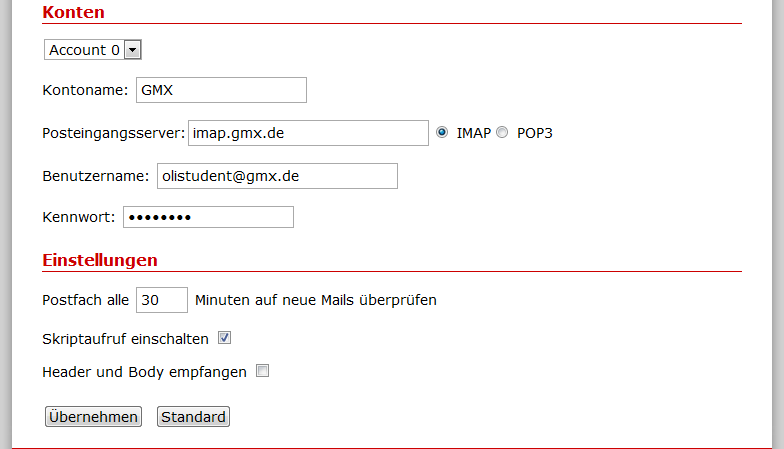
Three different mail accounts can be configured. Enter an account name,
username, password, and then the provider's POP or IMAP server.
In addition, the check interval and script behavior can be defined. The
configuration file can be viewed at /mod/etc/checkmaild.conf.
Script Function⚓︎
Starting with version 0.4, there is also a script function. It is used as
follows, with GMX as an example:
/mod/etc/maillog.cfg 0 2 1 "GMX" "8d3451bca04e6c2f227257baa821c4b7" "14.Sep" "10:09" "User <user@gmx.de>" "Betreff"]
- $1. Parameter: 0=New Mail received, 1=Status
- $2. Parameter: Mails total
- $3. Parameter: Current mail
- $4. Parameter: Account
- $5. Parameter: Message-ID
- $6. Parameter: Date
- $7. Parameter: Time
- $8. Parameter: From
- $9. Parameter: Subject
Variables $2 through $9 contain the email information when parameter $1
is "0" (new email received).
The script /tmp/flash/checkmaild/maillog.cfg can be adjusted through
the web interface. Testing can be done while checkmaild is running in the
foreground and the script produces output.
LED Signaling⚓︎
TODO
Telephone Notification⚓︎
TODO
Example Scripts⚓︎
Example:
And if this should now be displayed on a VDR in combination with the
callmonitor and the callaction script, the example looks like this:
    #!/bin/sh
    # new email received
    if [ "$1" = "0" ];
    then
    callaction vdr m741 "On $6 at $7, $8 wrote: $9"
    fi
Background information about callmonitor can also be found here in the
wiki under
callmonitor nachlesen.
Further Links⚓︎
- IPPF
Thread:
POP3/IMAP accounts with checkmaild