IRC⚓︎
Anyone looking for direct contact with the Zweirad and Fritz community
can use IRC. All you need is a web browser
or an IRC client. The IRC channel is called ##fritzbox and is hosted
on Freenode. Many different topics are discussed there. Although the
topic may suggest an English-speaking channel, most conversation is in
German; this may depend on how quickly a newcomer notices it. Follow the
administrator's rules, otherwise you may be muted.
Access data:
- In general: simply ask your questions. Answers may take a while; see
"IRC Netiquette".
IRC Netiquette⚓︎
IRC also has rules of conduct. Following them helps you use this medium
effectively; after all, you have questions and would like answers. The
rules of conduct
from "Netiquette & HOWTO for #debian.de" are not mandatory, but they give
useful hints for avoiding common mistakes.
Troubleshooting IRC⚓︎
- Unauthorized connection
If there are problems connecting, for example the error message
"Unauthorized connection", try using an alternative IRC server.
Tip: use an IRC server from your own country. An overview of all
Freenode servers is available
here.
Configure the Chatzilla Plugin in Firefox⚓︎
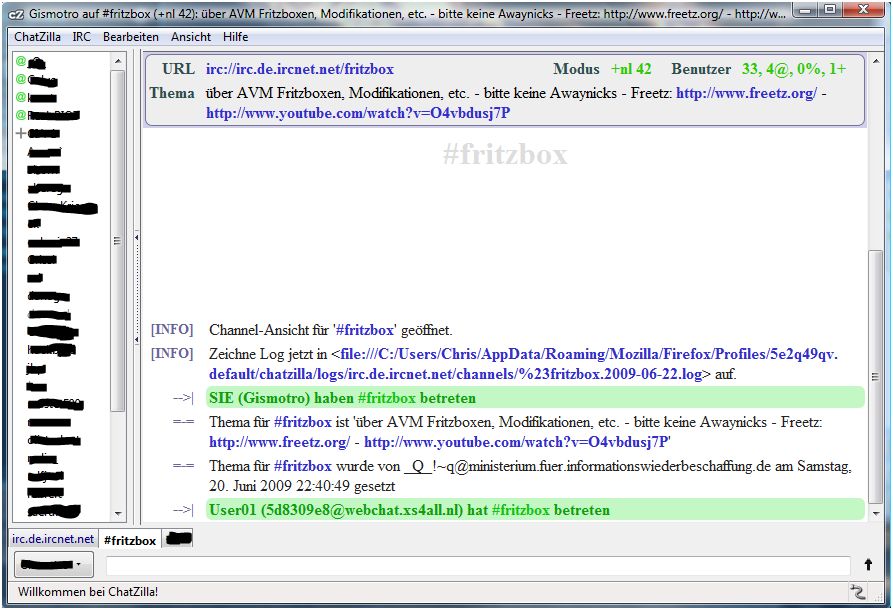
The Chatzilla plugin for Firefox can also be used
(Download).
Configuring the Chatzilla plugin:
- Install Chatzilla.
- Under Chatzilla -> Settings -> Global Settings ->
General, enter a username and nick. - Close Chatzilla again.
- Click this link:
irc://chat.freenode.net/##fritzbox - Chatzilla should now log into the Fritzbox chat with the newly assigned
nick; see the image above. - Under IRC, enable Channel at startup.
From now on, Chatzilla connects to ##fritzbox automatically whenever it
starts.