Dnsmasq 2.80/2.93⚓︎
- Homepage: https://thekelleys.org.uk/dnsmasq/doc.html
- Manpage: https://thekelleys.org.uk/dnsmasq/docs/dnsmasq-man.html
- Changelog: https://thekelleys.org.uk/dnsmasq/CHANGELOG
- Repository: https://thekelleys.org.uk/gitweb/?p=dnsmasq.git;a=summary
- Package: master/make/pkgs/dnsmasq/
- Steward: @fda77
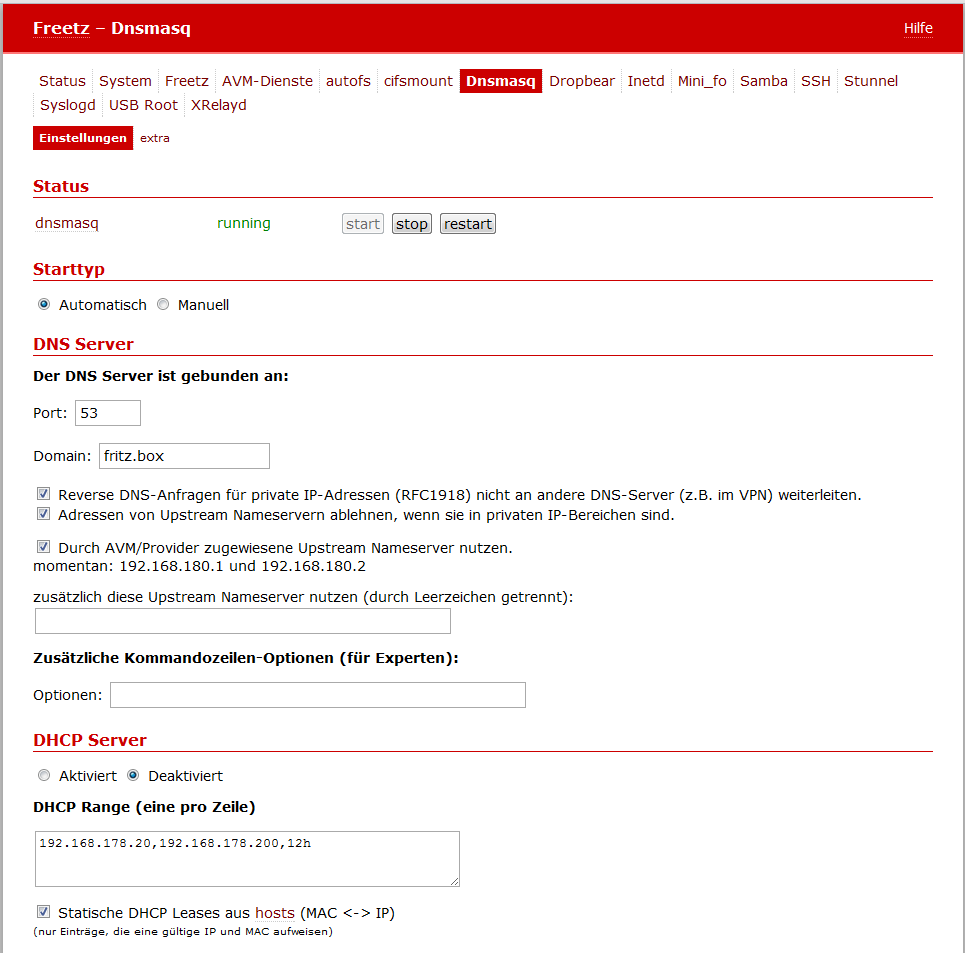
Dnsmasq makes it possible to operate the following on the FRITZBox:
- a DNS server that performs IP and name resolution centrally,
- a DHCP server that provides clients with an IP address and host
name, and - a TFTP server that, for example, enables booting via
PXE.
Dnsmasq runs completely on the FRITZBox, so no separate computers are
needed as DHCP server and DNS server.
The special thing is that dnsmasq supports static DHCP leases, which the
FRITZBox without Freetz can do only to a limited extent. It is now
possible to give a client a self-defined fixed IP, rather than only tying
an IP that was already assigned by DHCP firmly to the client.
Installation⚓︎
Dnsmasq is implemented as a package within Freetz and can simply be
selected when creating the firmware.
Configuration⚓︎
For configuration, the Freetz web interface provides these pages:
- Packages / Dnsmasq: options for startup behavior, DNS server, and
DHCP server (DHCP ranges) - Settings / Hosts: list of fixed host names
-
Settings / Dnsmasq: extra: text field for entering additional
options (dnsmasq long options without leading--) -
If the dnsmasq DHCP server should be used, the FRITZBox-internal DHCP
server from the original firmware must be disabled under System ->
Network settings -> IP addresses.
DNS Server⚓︎
In the section The DNS server is bound to: Port:, enter the port to
which the DNS server is bound. The default value here is port 53.
In the Domain field, the domain (domain part of the host name) for the
DHCP server can be specified.
This has two effects. First, it causes the DHCP server to return this
domain to hosts that request it. Second, it determines the domain that is
authorized to be requested by DHCP-configured hosts.
The intention behind this is to enforce a host name, so an untrusted host
in the LAN cannot specify its name via DHCP as, for example,
"ip-phone-forum.de".
If nothing was specified under Domain, every DHCP host name containing
a domain part is rejected. However, if a name was specified in the
Domain field, host names containing a domain part are allowed, provided
that this domain part and the name in the Domain field match.
If a name was specified under Domain and host names without a domain
part are therefore allowed, the name in the Domain field can also be
added as an optional domain part.
For example, if "fritz.box" is entered in the Domain field and there is
also a computer with the DHCP host name "Laptop", then with dnsmasq this
computer's IP address is available both as "Laptop" and as
"laptop.fritz.box".
If the domain is specified as "#", the domain is read from the first
"search" directive in /etc/resolv.conf.
Note 1: This function corresponds to the dnsmasq parameters
-E -s <domainname>.
Note 2: Attention: the entries already present in
resolv.conf,
such as nameserver 192.168.x.x or nameserver 127.0.0.1, come from
AVM and must not be deleted, otherwise AVM name resolution, for example
internet telephony, no longer works, regardless of whether the box is
connected to the internet via DSL or behind a cable modem. If necessary,
however, the addresses should be set, for example via telnet, to the
current DNS server or servers.
Redirecting the DNS Port with iptables⚓︎
For this, change the dnsmasq port to 50053 and disable the options
"start before multid" and "restart multid". In menuconfig, these
iptables options must be selected; depending on the kernel version, the
names vary somewhat.
For kernel 2.6.28, for example FritzBox 7320:
nf_conntrack nf_conntrack_ipv4 nf_defrag_ipv4 iptable_filter iptable_nat ip_tables ipt_REDIRECT
x_tables xt_tcpudp
libipt_REDIRECT
libxt_standard libxt_tcp libxt_udp
Load the modules at Freetz startup by entering them in 'modules'.
Run these iptables rules via rc.custom:
rport=50053

iptables -t nat -F dns 2>/dev/null
iptables -t nat -N dns

iptables -t nat -D PREROUTING -p tcp --dport 53 -j dns 2>/dev/null
iptables -t nat -I PREROUTING -p tcp --dport 53 -j dns
iptables -t nat -D PREROUTING -p udp --dport 53 -j dns 2>/dev/null
iptables -t nat -I PREROUTING -p udp --dport 53 -j dns

iptables -t nat -D OUTPUT -o lo -p tcp --dport 53 -j REDIRECT --to-port $rport 2>/dev/null
iptables -t nat -I OUTPUT -o lo -p tcp --dport 53 -j REDIRECT --to-port $rport
iptables -t nat -D OUTPUT -o lo -p udp --dport 53 -j REDIRECT --to-port $rport 2>/dev/null
iptables -t nat -I OUTPUT -o lo -p udp --dport 53 -j REDIRECT --to-port $rport

for _if in $(ifconfig | sed -nr 's/^([^ ]*) .*/1/p' | grep -vE "lo|dsl|:|eth"); do
_ip="$(ifconfig $_if 2>/dev/null | sed -n 's/.*inet addr:([0-9.]*).*/1/p')"
[ -z "$_ip" ] && continue
iptables -t nat -I dns -i $_if -p tcp -d $_ip -j REDIRECT --to-port $rport
iptables -t nat -I dns -i $_if -p udp -d $_ip -j REDIRECT --to-port $rport
done
This allows multid to occupy port 53, while dnsmasq is still used for
name resolution. Restarts of multid are also no longer necessary.
Command-Line Options⚓︎
Under Additional command-line options (for experts), further dnsmasq
options can be entered. Some of these options are explained in the
following examples. All parameters can be found on the original dnsmasq
man page.
All options can also be entered as a list under Settings ->
Dnsmasq-extra instead of as command-line options; omit the leading -
then. This is much more convenient and comments can also be added with
#. An example configuration can be found here:
dnsmasq.conf.example.
After saving changes, dnsmasq is restarted automatically so the changes
take effect. Otherwise, restart manually via Services -> dnsmasq
restart.
Example 1⚓︎
With command-line options:
or alternatively as a list:
a WINS and an NBDD server with NetBIOS node type "h-node" are entered on
the client at address 192.168.178.1. -O denotes special options for
DHCP clients, here for NetBIOS over TCP/IP; code 44 is followed by the
IP address for WINS servers, 45 by the address for NBDD servers, and
46 by the node type.
Most DHCP options are defined in
RFC2132. General information
about DHCP in German can be found at Microsoft
DHCP.
Example 2⚓︎
With command-line options:
or alternatively as a list:
custom DNS entries are used, in the example those from
www.OpenDNS.com. -S uses the DNS server with
the specified IP address. This switch does not suppress reading
resolv.conf; that must additionally be done with -R.
DHCP Server⚓︎
In the area DHCP Range (one per line), ranges are entered in the
following form:
The dnsmasq directive
for this is dhcp-range. Incidentally, almost all saved settings can be
found in the file /mod/etc/dnsmasq.conf.
Addresses from the range start-addr to end-addr are assigned, plus
the statically defined addresses from the entries in the hosts list.
If a lease time is specified, leases are issued for this period. The
lease time can be specified in seconds, for example 30, minutes, for
example 45m, hours, for example 1h, or by the word infinite.
This option can be repeated with different addresses to allow DHCP
service for more than one network.
A list of assigned leases can be found in the files
/var/tmp/dnsmasq.leases and /var/tmp/multid.leases. If you ever see
"strange" assignments of leases or IP addresses in the network, it is
always worth looking at these files. If necessary, they can also be
deleted completely with telnet. When dnsmasq is restarted, the files are
automatically recreated.
For directly connected networks, meaning networks to which the FRITZBox
running dnsmasq has an interface, netmask is optional. However, it is
required for networks that receive DHCP service via a relay agent.
The broadcast address is always optional. The optional network ID is an
alphanumeric label that identifies this network so DHCP options can be
specified on a per-network basis. If net: is placed in front, its
meaning changes from setting a tag to matching. Only one tag can be set,
but more than one tag can be matched. The end address can be replaced by
the keyword static, which instructs dnsmasq to enable DHCP for the
specified network but not dynamically allocate IP addresses. Only hosts
that have statically assigned addresses according to the entries in the
hosts list are served.
Example⚓︎
With the entry
addresses from IP 192.168.178.20 to IP 192.168.178.200 are assigned with
a lease time of 12 hours.
Entries in the Hosts List⚓︎
The entries in the fixed host names list allow a computer with a specific
hardware address to always be assigned the same host name, IP address,
and lease time. A host name specified here is delivered to the computer
via the DHCP client. Statically assigned IP addresses here are naturally
excluded from dynamic IP assignment.
Host names [with dots in the name] are [no longer allowed] as of release
1.6 (dnsmasq 2.40). dnsmasq acknowledges this with the error message
An assignment from the hosts list is then no longer possible, and other
addresses are simply assigned.
It is also permitted to omit the hardware address and specify only the
host name instead; in this case, IP address and lease time apply to every
possible computer that supplies this host name. For example,
00:20:e0:3b:13:af wap infinite instructs dnsmasq to assign the name
wap and an infinite DHCP lease time to the computer with hardware address
00:20:e0:3b:13:af.
lap 192.168.0.199 instructs dnsmasq to always assign the computer lap
the IP address 192.168.0.199. The addresses assigned this way are not
limited to the range specified by the dhcp-range option, but they must be
present in the network served by the DHCP server.
To identify hosts, the client ID can be used instead of the hardware
address by prefixing it with id:. Thus id:01:02:03:04 ..... refers to
the host with client ID !01:02:03:04. The client ID can also be specified
as text: id:clientidastext ...... The special option id:* means to
ignore all possible client IDs and use hardware addresses exclusively.
This is useful when a client usually has a fixed client ID, but sometimes
a different one.
Only if an entry with the corresponding name exists in the hosts list can
the associated IP address be assigned via a DHCP lease.
The special keyword ignore instructs dnsmasq never to offer a DHCP
lease to a computer. This computer can be specified by its hardware
address, client ID, or host name, for example 00:20:e0:3b:13:af ignore.
This is useful if there is another DHCP server in the network that should
be used by some computers.
The option net:<network-id> sets the network ID tag when this DHCP host
policy is used. This can be used to selectively send DHCP options for
this host. Ethernet addresses, but not client IDs, can contain wildcard
bytes such as 00:20:e0:3b:13:* ignore. This causes dnsmasq to ignore a
range of hardware addresses.
Hardware addresses can normally have any network (ARP) type, but it is
also possible to restrict them to individual ARP types by prefixing them
with the ARP type in HEX and a dash. Thus
06-00:20:e0:3b:13:af 1.2.3.4 designates only a Token Ring hardware
address, because the ARP address for Token Ring is 6.
Note: /etc/hosts is a symlink to /var/tmp/hosts. This, in turn, is
generated from hosts with the MAC addresses etc. when dnsmasq starts.
DHCP Hosts Entries --dhcp-host⚓︎
If the option "Read DHCP host information from a file." is enabled,
additional dhcp-hosts can be created via the dnsmasq parameter
--dhcp-host (Dnsmasq -> DHCP-hosts). This is a list of hosts:
[<hwaddr>][,id:<client_id>|*][,set:<tag>][tag:<tag>][,<ipaddr>][,<hostname>][,<lease_time>][,ignore]
Compared to the normal Freetz hosts list, this offers the advantage that
IPv6 addresses or suffixes can also be defined. (Attention: privacy.)
Furthermore, hosts can also be assigned only a host name by their
hardware address or client ID, while the IP address remains dynamic and
is assigned by dnsmasq from the pool. The host name is then resolved by
the dnsmasq DNS server.
By using tags, DHCP options can be assigned separately to each host. In
the following example, in addition to the /24 pool, a smaller pool, a
different DNS server, and a different default gateway are created. The
DHCP options are defined by IANA: DHCP
Options
First, another pool must be added and assigned a tag. Add it under "DHCP
Range (one per line)":
Additional DHCP options can be created in the "extra" file as follows:
dhcp-option=tag:no_adaway,6,8.8.8.8,8.8.4.4   # 6 - DNS Server
dhcp-option=tag:no_adaway,15,local            # 15 - domain name
dhcp-option=tag:no_internet,3,192.168.100.253 # 3 - default GW
If there are now 2 clients, one should use Google's DNS directly without
an ad blocker, while the other client should not use the FritzBox as the
router but another gateway:
11:22:33:AA:BB:CC,set:clients,set:no_internet,tv-livingroom
33:22:11:CC:BB:AA,set:clients,set:no_adaway,smartphone-01
Both clients receive an address from the "clients" pool (.30 - .40), but
with correspondingly different DHCP options.
DHCP Boot⚓︎
The DHCP boot entry is used for options of the
BOOTP protocol.
Together with the TFTP server, diskless workstations can be configured
with it.
The dnsmasq directive
for this is dhcp-boot.
TFTP Server⚓︎
For a TFTP server, the dnsmasq directives
are: enable-tftp and tftp-root.
Example⚓︎
The integrated TFTP server for access to the data under /var/ftpd is
enabled as follows:
In addition to the --enable-tftp parameter, which enables the
integrated TFTP server, specify via --tftp-root=/some_path_on_the_box
where the files that may be accessed via TFTP are located. If a client
computer should be booted via BOOTP (Bootstrap Protocol; the extended
automatic method via PXE [Preboot Execution Environment] is not possible
here) and TFTP, the corresponding boot image must also be defined. This
is done with the following parameter:
This sets the BOOTP options returned by the DHCP server. Servername and
serveraddress are optional; if nothing is specified here, the name is
left empty and the address is set to the address of the FRITZBox on which
dnsmasq runs. For the TFTP service provided by dnsmasq with
--enable-tftp, only the file name that enables booting is required
here. If optional network IDs are specified, they must match the
configuration to be sent and must also have the prefix net:.
One use for all this is booting the Debian Etch installer via the
network. To do this, create the directory tftp on a USB storage device,
download netboot.tar.gz from a Debian mirror, for example from the
Debian mirror of TU
Chemnitz,
and unpack it into the newly created directory. If the storage device is
formatted with NTFS or FAT32, the complete folder
debian-installer/i386/pxelinux.cfg and the file
debian-installer/i386/pxelinux.0 must be moved to the same level as
debian-installer. Then configure dnsmasq as follows, adjusting the path
if necessary depending on the Freetz build configuration:
If the TFTP server runs on another computer, for example here on
192.168.178.10 with bootfile pxelinux.0, specify it as follows:
Completely Custom Configuration⚓︎
Completely custom configurations can also be used. To do this, create an
empty executable file named /tmp/flash/dnsmasq_conf and then enter the
desired configuration in the Freetz web interface under Settings ->
Dnsmasq: extra. Syntax information can be found under example
configuration.