Subversion 1.9.12/1.14.5⚓︎
- Homepage: https://subversion.apache.org/
- Manpage: https://subversion.apache.org/quick-start
- Changelog: https://subversion.apache.org/docs/release-notes/release-history.html
- Repository: https://svn.apache.org/viewvc/subversion/
- Package: master/make/pkgs/subversion/
- Steward: @fda77
Subversion (SVN)
is free software for versioning files and directories.
Versioning takes place in a central project archive (repository) using a
simple revision count. When changes to content are made across the
contributors' computers, only the differences from existing states are
transferred between the project archive and a workstation.
Included Program Components⚓︎
  --------------- --------------------------------------------------------------------------------------------------------
  svn             The command-line program
  svnadmin        A tool for creating, modifying, or repairing a repository
  svndumpfilter   A program for filtering Subversion repository dump streams
  svnlook         A tool for directly examining a Subversion repository
  svnserve        A special server program that can run as a background process or be invoked by SSH;
                  another way to make the repository available over a network
  svnsync         A program for incrementally mirroring a repository over a network
  svnversion      A program that reports the state of a working copy based on the revisions of its objects
  --------------- --------------------------------------------------------------------------------------------------------
WebIF⚓︎
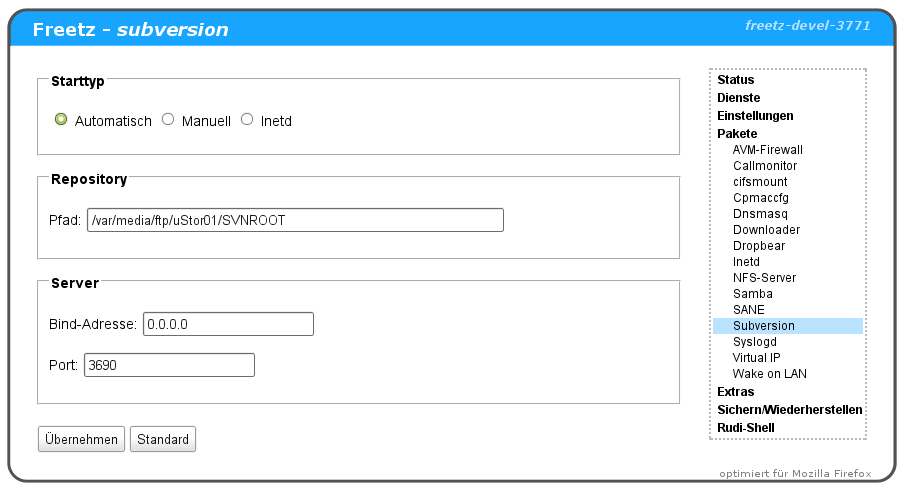
Configuration⚓︎
A repository is created with the following command:
REPOSITORY_NAME is a placeholder and can be chosen freely. The storage
medium must be formatted with ext2 or ext3; repositories on FAT or NTFS
media are not currently supported by Freetz.
After the repository has been created, the following files can be found
or newly created in the REPOSITORY_NAME/conf directory. Which entries
can be made in them and what they mean can be read
hier
here. The simplest possible configuration could look like this:
authz simply empty
passwd
svnserve.conf