NcFTP 3.3.0 (binaries only)⚓︎
- Homepage: https://www.ncftp.com/ncftp/
- Manpage: https://www.ncftp.com/ncftp/doc/faq.html
- Changelog: https://www.ncftp.com/download/
- Package: master/make/pkgs/ncftp/
- Steward: @fda77
"NcFTP Client (also known as just NcFTP) is a set of FREE application
programs implementing the File Transfer Protocol (FTP)."
What is NcFTP?⚓︎
NcFTP Client is a command-line FTP client. It has advanced functions such
as automatic filename completion, background processing, bookmarks,
downloading entire directory trees, and directory caching.
NcFTP includes the commands ncftpget, ncftpput, and ncftpls. These can be
used to download or upload files directly from the command line or to
display directories. This is especially helpful for shell scripts.
Source:
apfelwiki
What Can NcFTP Be Used For?⚓︎
1.) Upload files without the PC having to be started.
2.) Download files without the PC having to be
started.
How Do I Install NcFTP?⚓︎
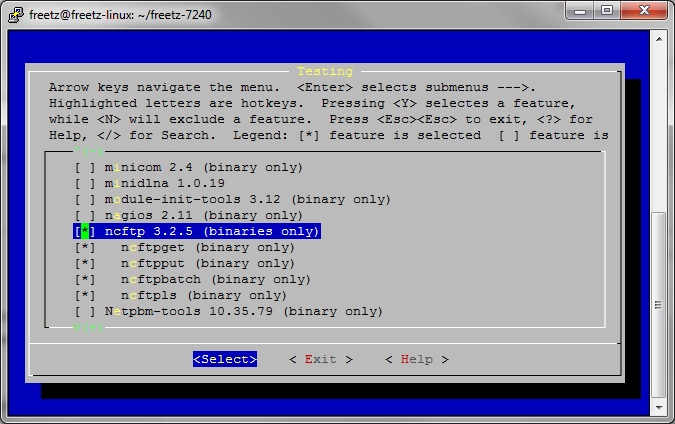
Select the NcFTP package when building a new Freetz image. In trunk,
NcFTP can be found under Packages -> Testing.
How Do I Start NcFTP?⚓︎
First, write a script such as upload.sh with the following content:
Then start it via Telnet/SSH with the command sh upload.sh.
How Is the Command in the upload.sh Script Structured?⚓︎
nohup ncftpput -u (Username) -p (Password) -m (FTP server address) /(target folder on the FTP)/ /(path to the local/own folder)/*
Example:
nohup ncftpput -u freetz -p mypass -m mustermann.no-ip.org /Uploads/ /var/media/ftp/uStor01/User/Mustermann/Downloads/*
For your information: nohup ensures that the script keeps running
even after Putty is closed.
What Does the Command for a download.sh Script Look Like?⚓︎
Example:
nohup ncftpget -u freetz -p mypass mustermann.no-ip.org /var/media/ftp/uStor01/Downloads /Downloads/*
How Can I Use a Different Port?⚓︎
If the standard port (21) should not be used, the desired port can be
specified with the -P xx parameter. The specified port should of
course match the port on which the server is listening.
nohup ncftpput -u (Username) -p (Password) -P (target port) -m (FTP server address) /(target folder on the FTP)/ /(path to the local/own folder)/*
Example: