Smartmontools 7.2/7.5⚓︎
- Homepage: https://www.smartmontools.org/
- Manpage: https://www.smartmontools.org/wiki/TocDoc
- Changelog: https://github.com/smartmontools/smartmontools/releases
- Repository: https://www.smartmontools.org/timeline
- Package: master/make/pkgs/smartmontools/
- Steward: @fda77
- Toolchain: requires GCC 4.7 or newer (
FREETZ_TARGET_GCC_4_7_MINinConfig.in): smartmontools 7.5 is built as C++11 (-std=c++11/-std=gnu++11), which the old GCC 4.6.4 toolchain does not recognize. This is a GCC issue, not uClibc-specific: uClibc 1.0.14 with GCC 5.5 builds fine.
Smartmontools, or more specifically smartctl, can read the "health
values" of hard disks (also called
SMART
values) and display them in the Freetz web interface under Status. This
only works if the hard disk and its USB hard-disk enclosure allow these
values to be read.
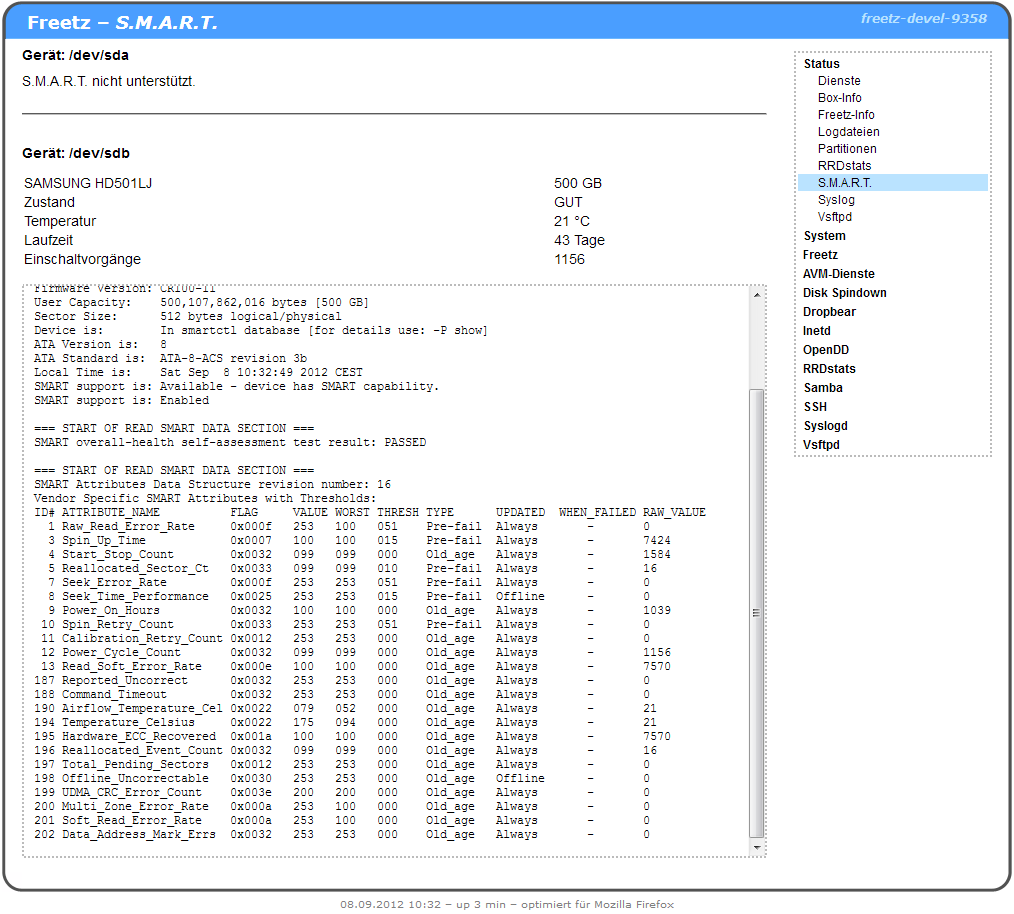
The following values are shown in the web interface:
- Model name of the hard disk and its storage capacity.
- The general condition, or health, of the hard disk as assessed by
SMART. - Current hard-disk temperature in °C.
- Previous hard-disk runtime.
- Number of power-on events.
- Then all available values, as they would also be seen on the console.
Note:
Opening the status page in the web interface spins up any parked hard
disk. It can therefore take a little while until the status page is fully
displayed.