WOL 0.7.1 (binary only) - DEPRECATED⚓︎
- Package: master/make/pkgs/wol/
- Steward: -
There are two programs that support WoL:
1. ether-wake, which is integrated into busybox, and
2. wol, which can be used if there are problems with ether-wake.
The wol package is "binary only", but for some time it has also been
usable through wol-cgi.
Wake on LAN Web Interface (wol-cgi)⚓︎
The wol-cgi package can be used to control the Busybox applet
ether-wake. This can wake PCs over the local network (LAN) or over the
internet (WAN).
Configuration on the Fritzbox⚓︎
A PC that should be woken must be added to the host list. The host list
can be edited in the following ways:
- Packages -> Wake on LAN -> Edit hosts
- Settings -> Hosts
To use Wake on LAN, at least the MAC address and host name must be
entered; ideally, also enter the IP address and the interface (usually
eth0) right away. Examples:
#<ip>           <mac>              <interface> <host>  [<description>]  (*... not defined)
*              0A:B1:2C:D3:4E:F5  *           server
192.168.178.2  0A:B1:2C:D3:4E:F5  eth0        server  This is my server
Further settings can be made in the Packages -> Wake on LAN menu:
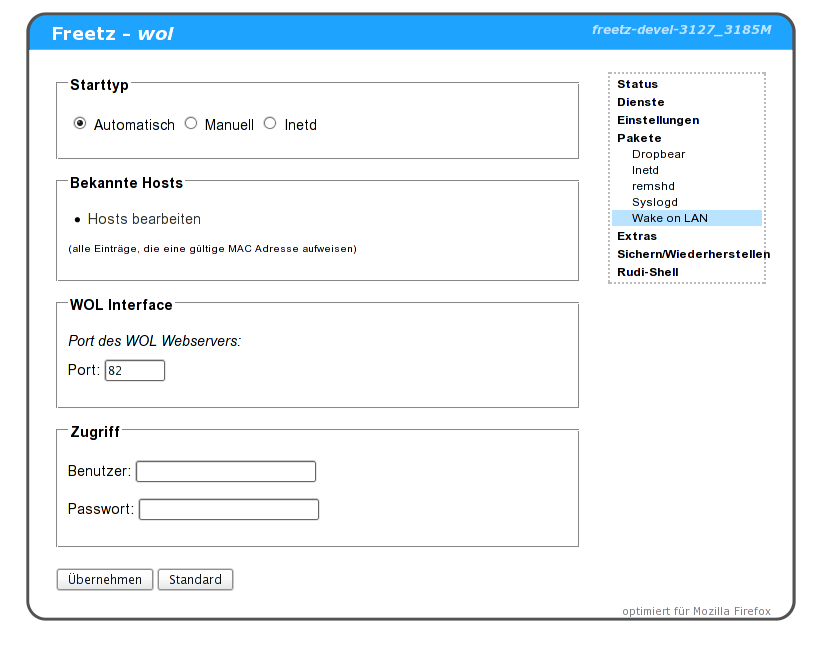
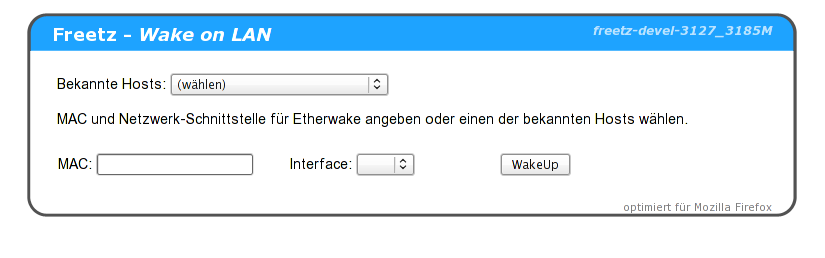
Afterwards, the WoL web interface can be reached via fritz.box:82 or
the "Freetz WOL" menu item in the AVM web interface. There, select the
PC from the "Known hosts" list. The MAC and interface entries are filled
in automatically, and clicking "WakeUp" starts the selected PC.
If there are problems, first try whether the PC can be woken by other
means, for example from other PCs. This ensures that the PC is configured
correctly. In addition, the wol binary can be tried instead of
the Busybox ether-wake applet.