Screen 4.9.1/5.0.1⚓︎
- Homepage: https://www.gnu.org/software/screen/
- Manpage: https://www.gnu.org/software/screen/manual/
- Changelog: https://git.savannah.gnu.org/cgit/screen.git/refs/
- Repository: https://git.savannah.gnu.org/cgit/screen.git
- Package: master/make/pkgs/screen/
- Steward: @fda77
"Screen is a full-screen window manager that multiplexes a physical
terminal between several processes, typically interactive shells."
http://www.gnu.org/software/screen/
screen creates a shell that remains available even after logging out,
and that can be detached and reattached at will. Each time, the screen is
restored, even if it should have changed.
Usage⚓︎
screen can be invoked without anything else and then provides a normal
shell. screen can also be invoked with a command as an argument, after
which that command is executed until it exits on its own or the process
is terminated. In other words: the poor man's daemon version, because any
process can be run in the background this way without having been
programmed as a daemon.
Detach⚓︎
With CTRL+A and then D, you can detach from a shell that then
continues running in the background.
Attach⚓︎
Outside the detached shell, screen -x can be used to attach to the
shell from which you detached, if there is only one. screen -list shows
a list of shells running in the background. The names, which can be
changed with screen -t <newName>, are used to select a shell with
screen -r <Name>.
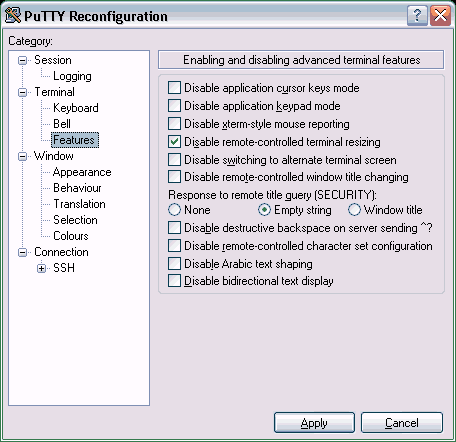
PuTTY Tip: Prevent Window Width Changes When Starting Screen⚓︎
Small tip for PuTTY users: when screen starts, the program sometimes
changes the window width to 80 characters on its own. This can either be
prevented with an appropriate setting in screen (command
termcapinfo),
which I do not understand well enough, or server-side size changes of the
terminal can be forbidden with a PuTTY setting; see the image. The
window size can still be changed on the client side.
Further Links⚓︎
- Screen
on Wikipedia