Freetz as an Internal Router with Firewall⚓︎
This guide contains everything needed to turn a FRITZ!Box 7050 with
Freetz into an internal router with a firewall and a real DMZ. Other
routers also work as long as they run Linux, have iptables, and have two
separately addressable network interfaces. Devices with a switch that can
only be addressed as one interface cannot create a LAN DMZ
(DeMilitarized Zone). WLAN, however, can be separated on all
routers.
Target Audience⚓︎
Ambitious home users and small to medium-sized businesses that need an
extra-secured WLAN and/or a second network.
Example Scenario⚓︎
- Internal network 1: 192.168.178.0/255.255.255.0 (user network)
- Internal network 2: 192.168.181.0/255.255.255.0 (server network, real DMZ)
- WLAN: 192.168.182.0/255.255.255.0
- Internet router: 192.168.178.1, for example another FRITZ!Box in the
internal network that also acts as DNS server.
All users of internal network 1 should be able to access all of network
2, while WLAN users should only be able to access the internet and
certain services in the DMZ. As an example, we use a web server, mail
server, and FTP server with this data:
- Webserver: IP 192.168.181.5, Ports 80,443
- Mailserver: IP 192.168.181.6, Ports 25,143,110,993,995
- FTP server: IP 192.168.181.7, port 21,(20). FTP needs an additional
port for the return channel, depending on the mode, active or passive.
Switch the FRITZ!Box to Separate Networks⚓︎
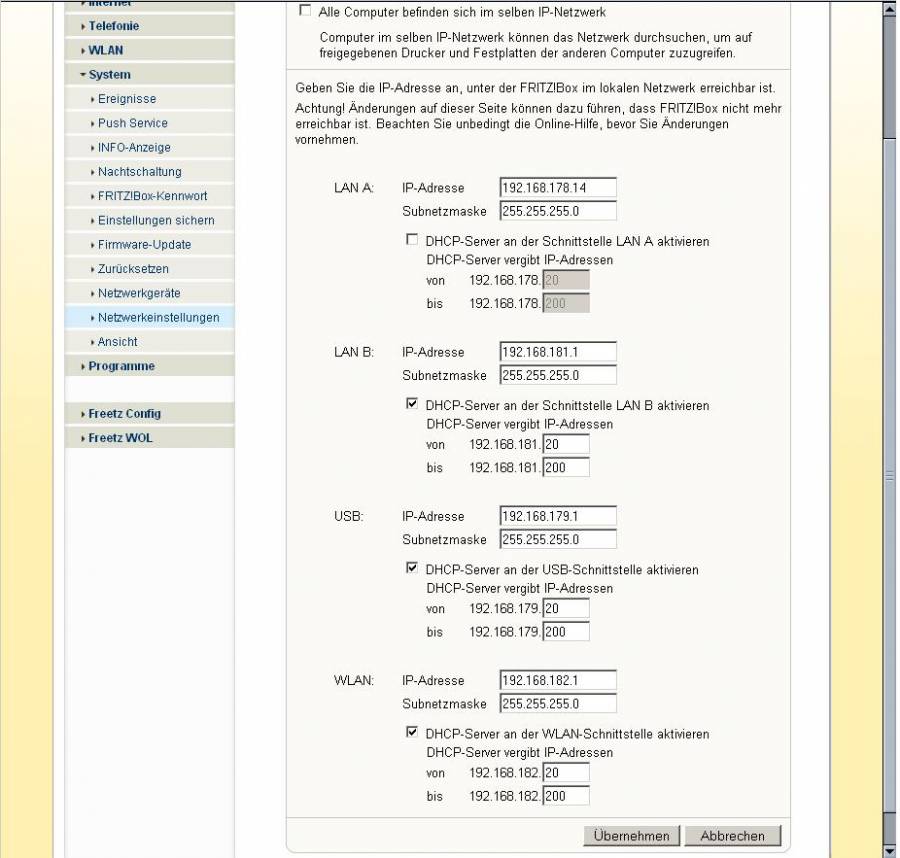
Under Settings -> System -> Network settings -> "IP addresses", disable
All computers are in the same IP network. Each interface, LAN-A, LAN-B,
WLAN, and USB, now has its own network:
Return Routes⚓︎
At the moment, packets can be sent from the DMZ/WLAN to the internet and
from the DMZ to the internal network, which will later be restricted by
the firewall. But the internet router, which is also the default router
for all computers, does not yet know the new networks and therefore drops
all reply packets.
On workstation marvin (192.168.178.2):
    jr@marvin$ ping -c 4 192.168.181.1
    PING 192.168.181.1 (192.168.181.1) 56(84) bytes of data.

    --- 192.168.181.1 ping statistics ---
    4 packets transmitted, 0 received, 100% packet loss, time 2999ms
The return routes must therefore be configured on the internet router.
Example Linux router:
    route add -net 192.168.181.0 netmask 255.255.255.0 gw 192.168.178.14
    route add -net 192.168.182.0 netmask 255.255.255.0 gw 192.168.178.14
    route add -net 192.168.179.0 netmask 255.255.255.0 gw 192.168.178.14
Example FRITZ!Box:
Under Settings -> System -> Network settings -> "IP routes", select
"New route":
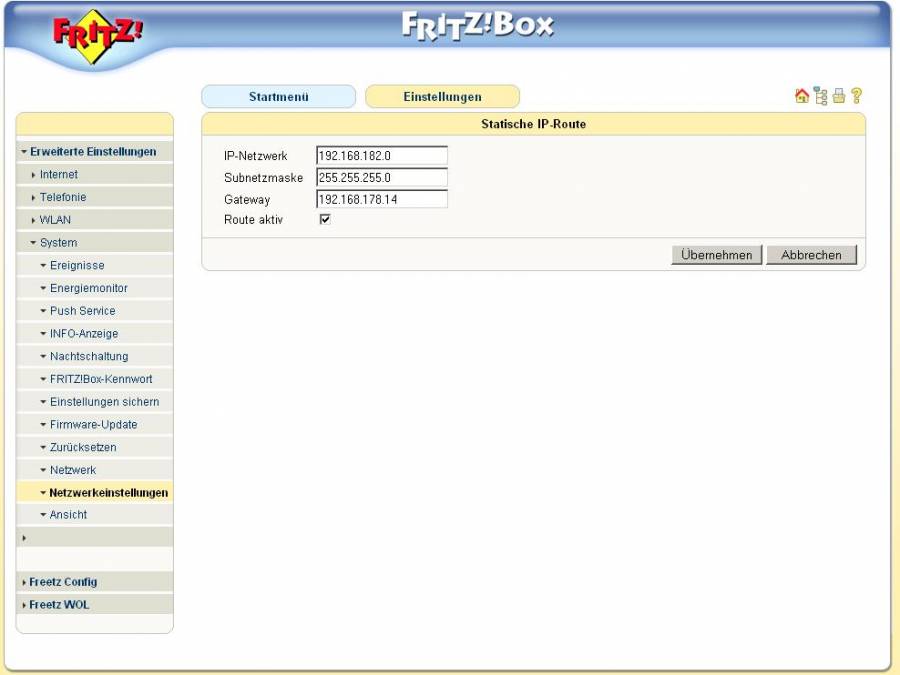
    Aktiv     Netzwerk    Subnetzmaske    Gateway
    X   192.168.181.0   255.255.255.0   192.168.178.14 #LANB
    X   192.168.182.0   255.255.255.0   192.168.178.14 #WLAN
    X   192.168.179.0   255.255.255.0   192.168.178.14 #USB
Packets now return as well. The redirect message from the default gateway
is interesting here: it now points the computer to the internal FRITZ!Box.
    jr@marvin$ ping 192.168.181.1
    PING 192.168.181.1 (192.168.181.1) 56(84) bytes of data.
    From 192.168.178.1: icmp_seq=1 Redirect Host(New nexthop: 192.168.178.14)
    64 bytes from 192.168.181.1: icmp_seq=1 ttl=64 time=2.43 ms
    From 192.168.178.1: icmp_seq=2 Redirect Host(New nexthop: 192.168.178.14)
    64 bytes from 192.168.181.1: icmp_seq=2 ttl=64 time=2.43 ms
    64 bytes from 192.168.181.1: icmp_seq=3 ttl=64 time=0.519 ms
    64 bytes from 192.168.181.1: icmp_seq=4 ttl=64 time=0.521 ms
    64 bytes from 192.168.181.1: icmp_seq=5 ttl=64 time=0.523 ms
FIXME copied post⚓︎
From what I have read, you need a router with a firewall. iptables has
been the standard Linux firewall since kernel 2.4, but AVM built
something of its own. As a router you can use anything on which a) Linux
runs, b) a real firewall runs, and c) you can change the firewall rules.
That means you can use a FRITZ!Box with Telnet or SSH access (AVM
firewall), a FRITZ!Box modified with Freetz (iptables), or a Linux
computer (iptables). Edit 2: after some more testing, I have now found
that the AVM firewall probably only works with the DSL interface. So we
need iptables.I consider the Linux computer overkill, since you want to use a
FRITZ!Box for WLAN anyway. To avoid unnecessarily rebuilding your own
network, I would take one of the 7050 FRITZ!Boxes and connect port A to
your network.I will try to write a guide: (EDIT: something still is not working
properly, see below.) From here on, everything is done only on the 7050
for the neighbor:
- The box first needs an internal IP, meaning an IP in your network, so
you can access it. Afterwards, each port gets its own network; see
image 1:\
Web interface -> Settings -> System -> Network settings: disable
"All computers are in the same IP network". Each port now has its own
network. It is important that the DHCP server for the internal network
is off; otherwise, you have two DHCP servers interfering with each
other. - The internet connection is now set to port A; see image 2.\
The trick is to select DSL connection, not port A, because otherwise
you no longer have the separate networks. -
Add a route:
4a) Add routes on the internet FRITZ!Box
-
Enable Telnet.\
There are enough guides in the forum. With newer firmware versions, a
Telnet pseudo-image should work. - Firewall.\
Edit at the moment: I have tested this much locally and can reach the
box; DNS works, also from the other networks. The only thing still
causing problems here is routing between the networks and therefore
also to the internet. Something is blocking routing; the same settings
work on a Linux computer with forwarding enabled. Maybe someone else
knows more. I had simply forgotten the return route on the second
FRITZ!Box for internet access; see 4a.