pptpd 1.4.0 - DEPRECATED⚓︎
- Homepage: https://sourceforge.net/projects/poptop/
- Changelog: https://sourceforge.net/projects/poptop/files/pptpd/
- Repository: https://sourceforge.net/p/poptop/git/ci/master/tree/
- Package: master/make/pkgs/pptpd/
- Steward: -
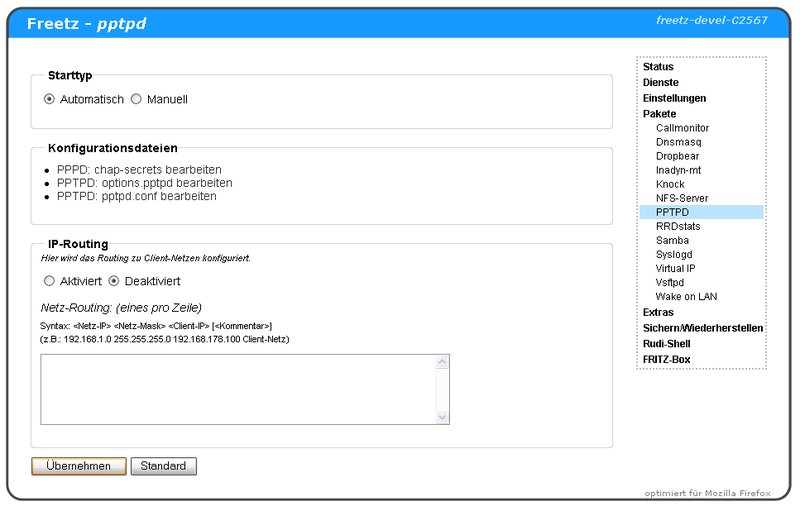
The interface itself is easy to understand ;-).
The links to the individual configuration files can be found under
Settings.
An overview of the available settings is provided by the Poptop
documentation on their
Homepage.
- "Edit pptpd settings" edits the file
pptpd.conf- path specifications for the binary and the configuration file
- enable possible debug information
- define the server IP (default: localip 192.168.178.1)
- define the IP range of logged-in computers (default: remoteip
192.168.178.210-229 ) - miscellaneous
- "Edit PPPD settings" edits the file
options.pptpd- name of the PPTP server (default: fritzbox)
- specify which protocols are allowed
- define DNS servers for clients (default: ms-dns
192.168.178.1) - miscellaneous
- "Edit password" edits the file
chap-secrets- manages authorized users and their passwords
Port Forwarding⚓︎
To ultimately be able to connect to the PPTP server from the outside,
port forwarding to the IP of the FRITZBox must of course be configured.
See also the following packages:
Configuration⚓︎
The three files relevant for Poptop can be edited either through the web
interface or on the shell using vi. They are located in the directory
/tmp/flash/ppp.
pptpd.conf⚓︎
In the supplied configuration, logwtmp is enabled by default (refers to
version 1.1.2-stable; already fixed in 'trunk'). This should be disabled,
because wtmp does not run on the fritzbox and therefore no VPN connection
is established.
If the data rate from WLAN to the internet is very slow with pptpd, the
line bcrelay should be commented out (see
IPPF)
options.pptpd⚓︎
The file options.pptpd may contain require-mppe-128 (refers to version
1.1.2-stable; already fixed in 'trunk'). However, pppd does not know this
option. When negotiating encryption with the client's 'Auto' setting,
connection problems may occur if the client first wants to negotiate, but
pppd wants to speak encrypted immediately. Encryption can be fixed
directly to 128 bit. With this setting, a PPTP connection with the iPhone
VPN client worked:
    # Require the peer to authenticate itself using MS-CHAPv2 [Microsoft
    # Challenge Handshake Authentication Protocol, Version 2] authentication.
    require-mschap-v2
    # Require MPPE 128-bit encryption
    # (note that MPPE requires the use of MSCHAP-V2 during authentication)
    #require-mppe-128

    mppe required,no40,no56,stateless
chap-secrets⚓︎
In options.pptpd, the name is set to fritzbox. This should then be
reflected in a user entry in chap-secrets:
In many examples on the internet, the second column contains pptpd. If
that is desired, simply adjust the name entry in options.pptpd
accordingly.
Troubleshooting⚓︎
To see the pptpd messages, first start a syslogd:
After that, the daemon's syslog messages can be viewed with logread:
To get more messages, debug mode can be enabled in options.pptpd and/or
pptpd.conf:
options.pptpd:
    # Enable connection debugging facilities.
    # (see your syslog configuration for where pppd sends to)
    debug
pptpd.conf:
Troubleshooting No Error Message⚓︎
In my case, no error message appeared in the log. Debugging on the box
with the following helps:
This showed that the following error message exists:
There is a thread about this in the forum; the last post explains how the
toolchain must be rebuilt to fix it:
http://www.ip-phone-forum.de/showpost.php?p=1407147&postcount=25
Update [2011-07-18]: The problem should no longer occur with Freetz 1.2
or a current trunk.