Cifsmount 7.0 - DEPRECATED⚓︎
- Homepage: https://wiki.samba.org/index.php/LinuxCIFS_utils
- Changelog: https://wiki.samba.org/index.php/LinuxCIFS_utils#News
- Repository: https://git.samba.org/?p=cifs-utils.git;a=summary
- Package: master/make/pkgs/cifsmount/
- Steward: -
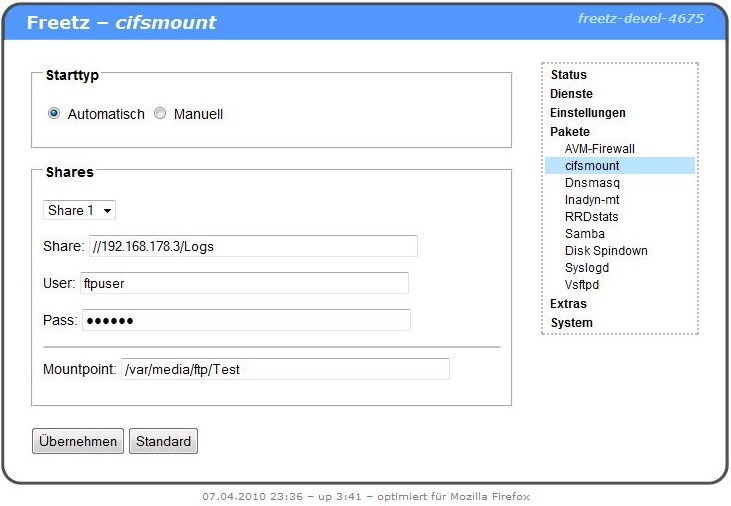
This package provides the helper tools for mounting CIFS network shares,
including a web interface for simple configuration of up to three mounts,
optionally with automatic start/stop events.
CIFS (Common Internet File System) is an extended version
of
SMB
, the protocol used by MS Windows and also by Samba to make
folders, files, and printers available on the network. cifsmount can
therefore replace a Samba client, with another major advantage when we
think of our FritzBox: cifsmount needs much less storage space, making it
the first choice for those who want to mount Windows or Samba shares on
the FritzBox.
cifsmount Configuration⚓︎
Start type: Automatic (when the box starts) or manual (start the
service by hand).
Shares: Up to five shares can be created through the web interface.
Share: The share to be mounted is entered here.
User: Username for the share.
Pass: Password for the share.
Mountpoint: The location where the share should be mounted on the
box.
Mountoptions: Additional option appended to the mount command, for
example noserverino with very large hard disks.
Troubleshooting⚓︎
With echo 1 > /proc/fs/cifs/cifsFYI, cifs can be made a bit more
verbose. The messages can be viewed with dmesg | tail. If the username
is missing or the password is wrong, it looks like this, for example:
root@fritz:/var/mod/root# mount -t cifs //192.168.1.1/Freetz /var/media/ftp
 CIFS VFS: Send error in SessSetup = -13
 CIFS VFS: Send error in SessSetup = -13
mount: mounting //192.168.1.172/Freetz on /var/media/ftp failed: Permission denied
root@fritz:/var/mod/root# dmesg | tail
 CIFS VFS: No username specified
Status code returned 0xc000006d NT_STATUS_LOGON_FAILURE
 CIFS VFS: Send error in SessSetup = -13
Further Links⚓︎
- Wikipedia
article
about the SMB protocol and CIFS - cifsmount Man
page